<html> <p>I once asked a software developer at work how many times we called fork() in our code. I’ll admit, it was a very large project, but I expected the answer to be — at most — two digits. The developer came back and read off some number from a piece of paper that was in the millions. I told them there was no way we had millions of calls to fork() and, of course, we didn’t. The problem was the developer wasn’t clear on the difference between a regular expression and a glob.</p><p>Tools like grep use regular expressions to create search patterns. I might write
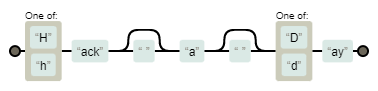
[Hh]ack ?a ?[Dd]ay
as a regular expression to match things like “HackaDay” and “Hack a day” and, even, “Hackaday” using a tool like grep, awk, or many programming languages.</p><h2>So What’s a Glob?</h2><p>The problem is the shell also uses pattern matching and uses many of the same characters as regular expressions. The fork call? The pattern the developer used was
fork*
. This would be OK — maybe not great — as a glob if you were afraid there were calls that started with
fork
but then had something else following (like an
exec
call which might be
execl
,
execv
, or one of several others).</p><p>If the shell saw that pattern it would look for anything that started with
fork
and then had zero or more characters following it. But as a regular expression, the meaning is quite different. The pattern actually meant: the letters
f o r
followed by zero or more occurrences of the letter
k
. So
for
would match. So would
fork
. As would
forkkkkk
. Also things like
forth
,
format
, and
formula
. So the matching number was enormous.</p><h2>Glob Survival Guide</h2><p>Globbing is typically a function of the shell. When you enter something like:</p><pre>ls a*</pre><p>The ls program never sees the
a*
. Instead, it sees the shell’s expanded list of files that start with the letter a. Well, that’s not exactly true. If there are no files that match the glob pattern, then ls will see the text you entered and will probably print an error message that it can’t find
a*
. At least, this is the default behavior. You can modify what the shell does if it can’t find a match (lookup
nullglob
and
failglob
).</p><p>This is a good thing because it means programs don’t have to write their own globbing and it all works the same inside a single shell. There may be differences, of course, depending on the shell you use. You can, also, turn off globbing in some shells. In bash, you can issue:</p><pre>set -f</pre><p>You’ll probably find that frustrating, though, so undo it with:</p><pre>set +f</pre><p>The most common special characters for globs are:</p><ul><li>* – zero or more characters</li><li>? – any character</li><li>[] – A class of characters like [abc] or [0-9]</li><li>[^] – Negative class of characters</li><li>[!] – Same as [^]</li></ul><p>If you have filenames that have a year in them like
post07-26-2020.txt
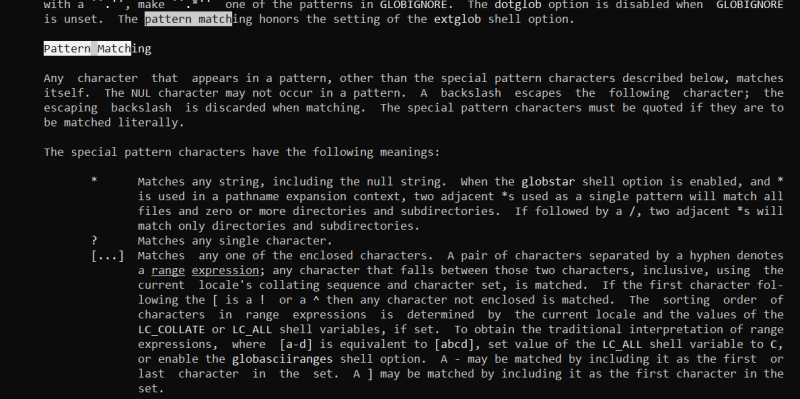
, you might write the following globs:</p><ul><li>post*2020.txt – All posts from 2020</li><li>post*202?.txt  All posts from 2020-2029 (or, even, 202Z; any character will match)</li><li>post0[345]*2020.txt – All posts from March, April, and May of 2020</li><li>post[!0][01]*.2021.txt – Posts from October or November 2021</li></ul><p>You can do a lot with a glob, but you can’t really do everything. Bash has other expansion options that can help, but those aren’t technically globs. For example, you could enter:</p><pre>process post{01,02,03,11,12}-*2020.txt</pre><p>However, that will expand, no matter if the files exist or not, to:</p><pre>post01-*2020.txt post02-*2020.txt post03-*2020.txt post11-*2020.txt post12-*2020.txt</pre><p>Then the shell will glob those patterns for actual file names. You can learn a lot more on the bash man page. Search for pattern matching.</p><figure id=„attachment_499084“ aria-describedby=„caption-attachment-499084“ class=„wp-caption aligncenter c1“><img data-attachment-id=„499084“ data-permalink=„https://hackaday.com/2021/10/07/linux-fu-globs-vs-regexp/man1/“ data-orig-file=„https://hackaday.com/wp-content/uploads/2021/09/man1.png“ data-orig-size=„1189,594“ data-comments-opened=„1“ data-image-meta=„{"aperture":"0","credit":"","camera":"","caption":"","created_timestamp":"0","copyright":"","focal_length":"0","iso":"0","shutter_speed":"0","title":"","orientation":"0"}“ data-image-title=„man1“ data-image-description=„“ data-image-caption=„<p>The bash man page has a lot on pattern matching</p>“ data-medium-file=„https://hackaday.com/wp-content/uploads/2021/09/man1.png?w=400“ data-large-file=„https://hackaday.com/wp-content/uploads/2021/09/man1.png?w=800“ class=„size-medium wp-image-499084“ src=„https://hackaday.com/wp-content/uploads/2021/09/man1.png?w=400“ alt=„Screen shot of man bash“ width=„400“ height=„200“ srcset=„https://hackaday.com/wp-content/uploads/2021/09/man1.png 1189w, https://hackaday.com/wp-content/uploads/2021/09/man1.png?resize=250,125 250w, https://hackaday.com/wp-content/uploads/2021/09/man1.png?resize=400,200 400w, https://hackaday.com/wp-content/uploads/2021/09/man1.png?resize=800,400 800w“ referrerpolicy=„no-referrer“ /><figcaption id=„caption-attachment-499084“ class=„wp-caption-text“>The bash man page has a lot on pattern matching</figcaption></figure><h2>A Little Regex Syntax</h2><p>Regular expressions are much more expressive, but also more variable. Every program that offers regular expressions uses its own code and, in some cases, it is significantly different than other programs. The good news is that the majority of regular expressions you want to use won’t be different. Usually, it is only the more obscure features that change, although that is little comfort if you hit one of those features.</p><p>The basic syntax is probably best represented by grep. However, if you are using something else you’ll need to check its documentation to see how its regular expressions might be different.</p><p>The biggest problem is that the
*
and
?
characters have completely different meanings from their glob counterparts. The
*
means zero or more of the previous pattern. So
10*
will match
1
,
10
,
100
,
1000
and so on.</p><figure id=„attachment_499088“ aria-describedby=„caption-attachment-499088“ class=„wp-caption alignright c2“><img data-attachment-id=„499088“ data-permalink=„https://hackaday.com/2021/10/07/linux-fu-globs-vs-regexp/regexp/“ data-orig-file=„https://hackaday.com/wp-content/uploads/2021/09/regexp.png“ data-orig-size=„378,91“ data-comments-opened=„1“ data-image-meta=„{"aperture":"0","credit":"","camera":"","caption":"","created_timestamp":"0","copyright":"","focal_length":"0","iso":"0","shutter_speed":"0","title":"","orientation":"0"}“ data-image-title=„regexp“ data-image-description=„“ data-image-caption=„<p>Our subject regexp represented graphically thanks to Regexper</p>“ data-medium-file=„https://hackaday.com/wp-content/uploads/2021/09/regexp.png?w=378“ data-large-file=„https://hackaday.com/wp-content/uploads/2021/09/regexp.png?w=378“ class=„size-medium wp-image-499088“ src=„https://hackaday.com/wp-content/uploads/2021/09/regexp.png?w=378“ alt=„Regular Expression diagram“ width=„378“ height=„91“ srcset=„https://hackaday.com/wp-content/uploads/2021/09/regexp.png 378w, https://hackaday.com/wp-content/uploads/2021/09/regexp.png?resize=250,60 250w“ referrerpolicy=„no-referrer“ /><figcaption id=„caption-attachment-499088“ class=„wp-caption-text“>Our subject regexp represented graphically thanks to <a href=„https://regexper.com“ target=„_blank“>Regexper</a></figcaption></figure><p>The question mark means the previous pattern is optional. So,
10?5
will match
105
and
15
equally well. For any character, in a regular expression, you use a period. So, going back to my original example,
[Hh]ack ?a ?[Dd]ay
you can see how this is not meaningful as a glob. The <a href=„https://regexper.com“ target=„_blank“>Regexpr</a> website does a nice job of graphically interpreting regular expressions, as you can see.</p><h2>Even More Confusion</h2><p>To make matters even more strange, starting with version 3, bash offers regular expressions in scripting so you could have a script with both globs and regular expressions that are both going to bash.</p><p>Then there’s the fact that bash offers a <a href=„https://www.gnu.org/software/bash/manual/bash.html#Pattern-Matching“ target=„_blank“>different style of glob</a> you can turn on with
shopt -s extglob
. These are actually closer to regular expressions, although the syntax is a bit reversed.</p><h2>Learning Regular Expressions</h2><p>I had thought about offering you a cheat sheet of common regular expressions, but then I realized I couldn’t do better than Dave Child so I decided <a href=„https://cheatography.com/davechild/cheat-sheets/regular-expressions/“ target=„_blank“>I’d just point you to that</a>.</p><p>Regular expressions have a reputation for being difficult, and that reputation is not wholly undeserved. But we’ve looked at ways to make regular expressions <a href=„https://hackaday.com/2020/09/11/linux-fu-literate-regular-expressions/“>more literate</a>, and if you need practice, try <a href=„https://hackaday.com/2016/01/31/crosswords-help-you-learn-regular-expressions/“>crosswords</a>.</p> </html>