Finding an RSS Feed Reader to Replace Google Reader
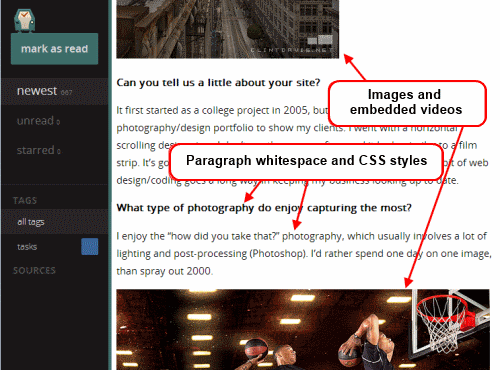
<html> <p>As soon as the shuttering of Google Reader was announced, I went on the hunt for alternatives. I've researched various options, both self-hosted and cloud-based. I've tested them all in parallel for over a week, and have come to a tentative conclusion.</p> <p>Your time is precious, here's my decision so far: My absolute favorite is <strong><a href=„http://selfoss.aditu.de/“>selfoss</a></strong>. It's fast, minimal, and looks beautiful in both desktop and mobile formats. It happened to be very easy to install, and had no trouble taking in my OPML file, and it already had the right keyboard navigation keys configured. It mostly worked correctly right out of the box.</p> <p>There were two settings I changed in the <tt>config.ini</tt> file: </p><pre> homepage=unread auto_mark_as_read=1 </pre> <p>That sets up the behavior I prefer. I want the site to always start with a list of unread content, and as I navigate around, I like the articles to be automatically marked as read.</p> <p>Did it say it was minimal? Oh, it <em>is</em>. Gloriously so. And a bit too much. It makes for a very consistent reading experience because it strips away the effect of almost all HTML elements. No embedded videos, many pictures are not displayed, all text is displayed at one size and one weight.</p> <p>That won't do for me. I want to see a little CSS beautification in my reader. Whitespace between paragraphs and seeing all the video and images is important to me. I need to know when the images are there. So I made some minor changes to the codebase.</p> <ol><li>Removed elements like <tt>strong</tt>, <tt>b</tt>, <tt>em</tt>, <tt>i</tt> and <tt>p</tt>, from the strip-all-style part of <tt>public/all.css</tt>.</li> <li>I used <a href=„http://simplepie.org/wiki/reference/simplepie/strip_htmltags#remove_object_param_and_embed_from_the_default_list“>this technique to remove elements from simplepie's strip_html list</a>. I allowed <tt>iframe</tt>, <tt>object</tt>, <tt>param</tt> and <tt>embed</tt> in <tt>spouts/rss/feed.php</tt> for embedded videos.</li> <li>I turned off <tt>safe</tt> and whitelisted the embedded video tags in the <tt>htmLawed</tt> object in <tt>helpers/ContentLoader.php</tt>.</li> <li>Finally, I made <a href=„http://selfoss.aditu.de/forum/index.php?id=170“>this change</a> from <tt>ref=</tt> to <tt>src=</tt> in <tt>helpers/ViewHelper.php</tt>. </li></ol><p>Having made the changes above, now the feeds in my selfoss reader retain some rudimentary style and properly display video and images.</p> <img alt=„selfoss.gif“ src=„http://david.dlma.com/blog/user/files/general/selfoss.gif“ width=„500“ height=„370“/><p>Now that's much better. This is a selfoss installation that I can live with.</p> <p>As for the runner-ups? I liked <a href=„http://tt-rss.org/redmine/projects/tt-rss/wiki“>Tiny Tiny RSS</a> a lot. But it was <em>slower</em> loading and responding. And the visual presentation for desktop mode wasn't as nice. There's too much clutter. Its mobile version is not supported, but <a href=„https://github.com/mboinet/ttrss-mobile“>ttrss-mobile</a> is awesome. Install it into <tt>/mobile</tt> for the easiest experience. Finally, remap they keys j and k to <tt>next_article_noscroll</tt> and <tt>prev_article_noscroll</tt> with a plugin.</p> <p>If I were forced to go with a 3rd party cloud-based product, I'd probably choose <a href=„http://www.feedly.com/“>Feedly</a>. It's relatively fast and minimal. After that, it's a toss-up between <a href=„http://www.netvibes.com“>NetVibes</a> and <a href=„http://theoldreader.com/posts/all“>The Old Reader</a>. I didn't pay <a href=„http://www.newsblur.com/“>NewsBlur</a> to see how they'd perform with a moderately large OPML. I'm looking forward to seeing what <a href=„http://www.digg.com/reader“>Digg</a> comes up with.</p> <p>And as for local desktop clients? They're not in the running. I need my feedreader to be current on any screen I happen to login to.</p> <p>Finally, some suggest using Twitter as Google Reader's replacement. I enjoy „dipping into the stream“ as it were in Twitter, Facebook and Reddit. But I need a tool that'll save articles from my favorite friends and content creators too. </p><p>I hope you may find this helpful. If nothing else, it'll serve to pinpoint the state of the art in early 2013 for keeping track of content online.</p>
  <p>
      March 29, 2013                 | Filed under <a href="http://david.dlma.com/blog/tag/projects" rel="tag">projects</a>, <a href="http://david.dlma.com/blog/tag/python" rel="tag">python</a> and <a href="http://david.dlma.com/blog/tag/code" rel="tag">code</a>
      | <a href="http://david.dlma.com/blog/finding-an-rss-feed-reader-to-replace-google-reader#comments" title="Comments on this post">
      1 Comment</a>
    </p> <!-- postmeta -->
<!– <h4>comments</h4> –>
<!– You can start editing here. –> <!– #contentleft –> </html>
 Falls nicht anders bezeichnet, ist der Inhalt dieses Wikis unter der folgenden Lizenz veröffentlicht: CC Attribution-Noncommercial-Share Alike 4.0 International