Learn To Loop The Python Way: Iterators And Generators Explained
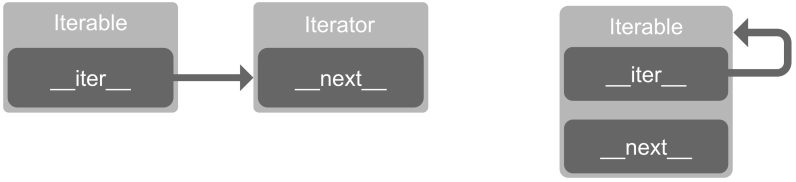
<html> <p>If you’ve ever written any Python at all, the chances are you’ve used iterators without even realising it. Writing your own and using them in your programs can provide significant performance improvements, particularly when handling large datasets or running in an environment with limited resources. They can also make your code more elegant and give you “Pythonic” bragging rights.</p> <p>Here we’ll walk through the details and show you how to roll your own, illustrating along the way just why they’re useful.</p> <p>You’re probably familiar with looping over objects in Python using English-style syntax like this:</p> <pre class=„brush: python; title: ; notranslate“ title=„“> people = 'Sam', 19], ['Laura', 34], ['Jona', 23 for name, age in people:
...
info_file = open('info.txt') for line in info_file:
...
hundred_squares = [x2 for x in range(100)] „, “.join([„Punctuated“, „by“, „commas“]) </pre> <p>These kind of statements are possible due to the magic of iterators. To explain the benefits of being able to write your own iterators, we first need to dive into some details and de-mystify what’s actually going on.</p> <h1>Iterators and Iterables</h1> <p>Iterators and iterables are two different concepts. The definitions seem finickity, but they’re well worth understanding as they will make everything else much easier, particularly when we get to the fun of generators. Stay with us!</p> <h2>Iterators</h2> <p>An <strong>iterator </strong>is an object which represents a stream of data. More precisely, an object that has a <code>next</code> method. When you use a for-loop, list comprehension or anything else that iterates over an object, in the background the <code>next</code> method is being called on an iterator.</p> <p>Ok, so let’s make an example. All we have to do is create a class which implements <code>next</code>. Our iterator will just spit out multiples of a specified number.</p> <pre class=„brush: python; title: ; notranslate“ title=„“> class Multiple: def init(self, number): self.number = number self.counter = 0 def next(self): self.counter += 1 return self.number * self.counter if name == 'main': m = Multiple(463) print(next(m)) print(next(m)) print(next(m)) print(next(m)) </pre> <p>When this code is run, it produces the following output:</p> <pre class=„brush: bash; gutter: false; title: ; notranslate“ title=„“> $ python iterator_test.py 463 926 1389 1852 </pre> <p>Let’s take a look at what’s going on. We made our own class and defined a <code>next</code> method, which returns a new iteration every time it’s called. An iterator always has to keep a record of where it is in the sequence, which we do using <code>self.counter</code>. Instead of calling the object’s <code>next</code> method, we called <code>next</code> on the object. This is the recommended way of doing things since it’s nicer to read as well as being more flexible.</p> <p>Cool. But if we try to use this in a for-loop instead of calling <code>next</code> manually, we’ll discover something’s amiss.</p> <pre class=„brush: python; first-line: 10; title: ; notranslate“ title=„“> if name == 'main': for number in Multiple(463): print(number) </pre> <pre class=„brush: bash; gutter: false; title: ; notranslate“ title=„“> $ python iterator_test.py Traceback (most recent call last): File „iterator_test.py“, line 11, in <module> for number in Multiple(463): TypeError: 'Multiple' object is not iterable </pre> <p>What? Not iterable? But it’s an iterator!</p> <p>This is where the difference between iterators and iterables becomes apparent. The for loop we wrote above expected an iterable.</p> <h2>Iterables</h2> <p>An <strong>iterable </strong>is something which is <em>able</em> to iterate. In practice, an iterable is an object which has an <code>iter</code> method, which <em>returns an iterator</em>. This seems like a bit of a strange idea, but it does make for a lot of flexibility; let us explain why.</p> <p>When <code>iter</code> is called on an object, it must return an iterator. That iterator can be an external object which can be re-used between different iterables, or the iterator could be <code>self</code>. That’s right: an iterable can simply return itself as the iterator! This makes for an easy way to write a compact jack-of-all-trades class which does everything we need it to.</p> <p><img data-attachment-id=„323619“ data-permalink=„https://hackaday.com/2018/09/19/learn-to-loop-the-python-way-iterators-and-generators-explained/iterators/“ data-orig-file=„https://hackadaycom.files.wordpress.com/2018/09/iterators1.png?w=800“ data-orig-size=„2785,637“ data-comments-opened=„1“ data-image-meta=„{"aperture":"0","credit":"","camera":"","caption":"","created_timestamp":"0","copyright":"","focal_length":"0","iso":"0","shutter_speed":"0","title":"","orientation":"0"}“ data-image-title=„Iterators“ data-image-description=„“ data-medium-file=„https://hackadaycom.files.wordpress.com/2018/09/iterators1.png?w=800?w=400“ data-large-file=„https://hackadaycom.files.wordpress.com/2018/09/iterators1.png?w=800?w=800“ class=„alignnone wp-image-323619 size-full“ src=„https://hackadaycom.files.wordpress.com/2018/09/iterators1.png?w=800“ alt=„“ srcset=„https://hackadaycom.files.wordpress.com/2018/09/iterators1.png?w=800 800w, https://hackadaycom.files.wordpress.com/2018/09/iterators1.png?w=1600 1600w, https://hackadaycom.files.wordpress.com/2018/09/iterators1.png?w=250 250w, https://hackadaycom.files.wordpress.com/2018/09/iterators1.png?w=400 400w, https://hackadaycom.files.wordpress.com/2018/09/iterators1.png?w=768 768w“ sizes=„(max-width: 800px) 100vw, 800px“/></p> <p>To clarify: strings, lists, files, and dictionaries are all examples of iterables. They are datatypes in their own right, but will all automatically play nicely if you try and loop over them in any way because they return an iterator on themselves.</p> <p>With this in mind, let’s patch up our <code>Multiple</code> example, by simply adding an <code>iter</code> method that returns <code>self</code>.</p> <pre class=„brush: python; title: ; notranslate“ title=„“> class Multiple: def init(self, number): self.number = number self.counter = 0 def iter(self): return self def next(self): self.counter += 1 return self.number * self.counter if name == 'main': for number in Multiple(463): print(number) </pre> <p>It now runs as we would expect it to. It also goes on forever! We created an infinite iterator, since we didn’t specify any kind of maximum condition. This kind of behaviour is sometimes useful, but often our iterator will need to provide a finite amount of items before becoming exhausted. Here’s how we would implement a maximum limit:</p> <pre class=„brush: python; title: ; notranslate“ title=„“> class Multiple: def init(self, number, maximum): self.number = number self.maximum = maximum self.counter = 0 def iter(self): return self def next(self): self.counter += 1 value = self.number * self.counter if value > self.maximum: raise StopIteration else: return value if name == 'main': for number in Multiple(463, 3000): print(number) </pre> <p>To signal that our iterator has been exhausted, the defined protocol is to raise <code>StopIteration</code>. Any construct which deals with iterators will be prepared for this, like the for loop in our example. When this is run, it correctly stops at the appropriate point.</p> <pre class=„brush: bash; gutter: false; title: ; notranslate“ title=„“> $ python iterator_test.py 463 926 1389 1852 2315 2778 </pre> <h1>It’s good to be lazy</h1> <p>So why is it worthwhile to be able to write our own iterators?</p> <p>Many programs have a need to iterate over a large list of generated data. The conventional way to do this would be to calculate the values for the list and populate it, then loop over the whole thing. However, if you’re dealing with big datasets, this can tie up a pretty sizeable chunk of memory.</p> <p>As we’ve already seen, iterators can work on the principle of lazy evaluation: as you loop over an iterator, values are generated <strong>as required</strong>. In many situations, the simple choice to use an iterator or generator can markedly improve performance, and ensure that your program doesn’t bottleneck when used in the wild with bigger datasets or smaller memory than it was tested on.</p> <p>Now that we’ve had a quick poke around under the hood and understand what’s going on, we can move onto a much cleaner and more abstracted way to work: generators.</p> <h1>Generators</h1> <p>You may have noticed that there’s a fair amount of boilerplate code in the example above. Generators make it far easier to build your own iterators. There’s no fussing around with <code>iter</code> and <code>next</code>, and we don’t have to keep track of an internal state or worry about raising exceptions.</p> <p>Let’s re-write our multiple-machine as a generator.</p> <pre class=„brush: python; title: ; notranslate“ title=„“> def multiple_gen(number, maximum): counter = 1 value = number * counter while value <= maximum: yield value counter += 1 value = number * counter if name == 'main': for number in multiple_gen(463, 3000): print(number) </pre> <p>Wow, that’s a lot shorter than our iterator example. The main thing to note is a new keyword: <code>yield</code>. <code>yield</code> is similar to <code>return</code>, but instead of terminating the function, it simply pauses execution until another value is required. Pretty neat.</p> <p>In most cases where you generate values, append them to a list and then return the whole list, you can simply <code>yield</code> each value instead! It’s more readable, there’s less code, and it performs better in most cases.</p> <p>With all this talk about performance, it’s time we put iterators to the test!</p> <p>Here’s a really simple program comparing our multiple-machine from above with a ‘traditional’ list approach. We generate multiples of 463 up to 100,000,000,000 and time how long each strategy takes.</p> <pre class=„brush: python; title: ; notranslate“ title=„“> import time def multiple(number, maximum): counter = 1 multiple_list = [] value = number * counter while value <= maximum: multiple_list.append(value) value = number * counter counter += 1 return multiple_list def multiple_gen(number, maximum): counter = 1 value = number * counter while value <= maximum: yield value counter += 1 value = number * counter if name == 'main': MULTIPLE = 463 MAX = 100_000_000_000 start_time = time.time() for number in multiple_gen(MULTIPLE, MAX): pass print(f„Generator took {time.time() - start_time :.2f}s“) start_time = time.time() for number in multiple(MULTIPLE, MAX): pass print(f„Normal list took {time.time() - start_time :.2f}s“) </pre> <p>We ran this on a few different Linux and Windows boxes with various specs. On average, the generator approach was about three times faster, using barely any memory, whilst the normal list method quickly gobbled all the RAM and a decent chunk of swap as well. A few times we got a <code>MemoryError</code> when the normal list approach was running on Windows.</p> <h1>Generator comprehensions</h1> <p>You might be familiar with list comprehensions: concise syntax for creating a list from an iterable. Here’s an example where we compute the cube of each number in a list.</p> <pre class=„brush: python; title: ; notranslate“ title=„“> nums = [2512, 37, 946, 522, 7984] cubes = [number3 for number in nums] </pre> <p>It just so happens that we have a similar construct to create generators (officially called “generator expressions”, but they’re nearly identical to list comprehensions). It’s as easy as swapping


[]
 for
()
. A quick session at a Python prompt confirms this.</p> <pre class=„brush: python; gutter: false; title: ; notranslate“ title=„“> >>> nums = [2512, 37, 946, 522, 7984] >>> cubes = [number3 for number in nums] >>> type(cubes) <class 'list'> >>> cubes_gen = (number3 for number in nums) >>> type(cubes_gen) <class 'generator'> >>> </pre> <p>Again, not likely to make much difference in the example above, but it’s a two-second change which does come in handy.</p> <h1>Summary</h1> <p>When you’re dealing with lots of data, it’s essential to be smart about how you use resources, and if you can process the data one item at a time, iterators and generators are just the ticket. A lot of the techniques we’ve talked about above are just common sense, but the fact that they are built into Python in a defined way is great. Once you dip your toe into iterators and generators, you’ll find yourself using them surprisingly often.</p> </html>
 Falls nicht anders bezeichnet, ist der Inhalt dieses Wikis unter der folgenden Lizenz veröffentlicht: CC Attribution-Noncommercial-Share Alike 4.0 International