Map Your Particles!
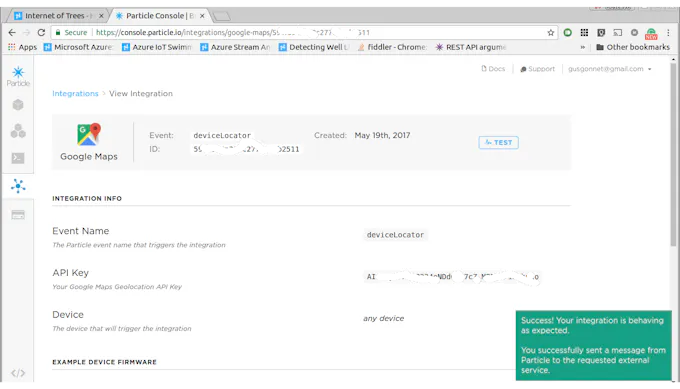
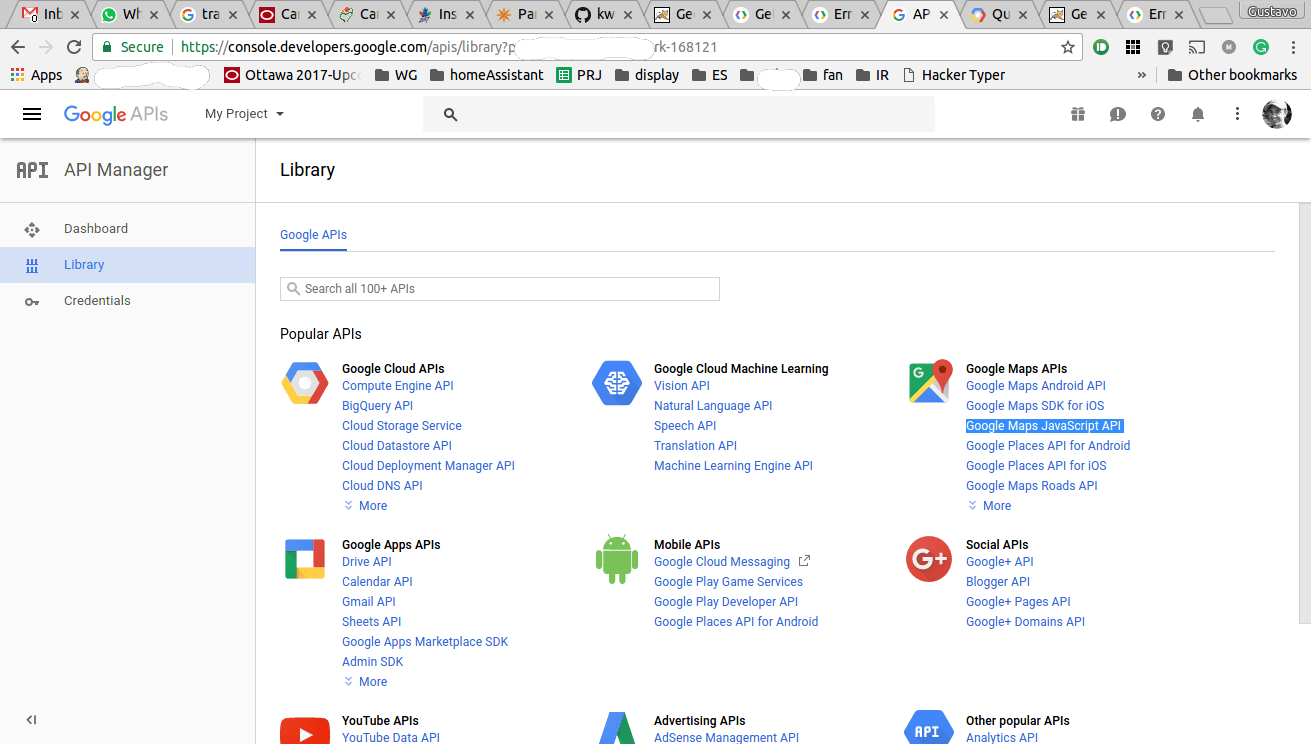
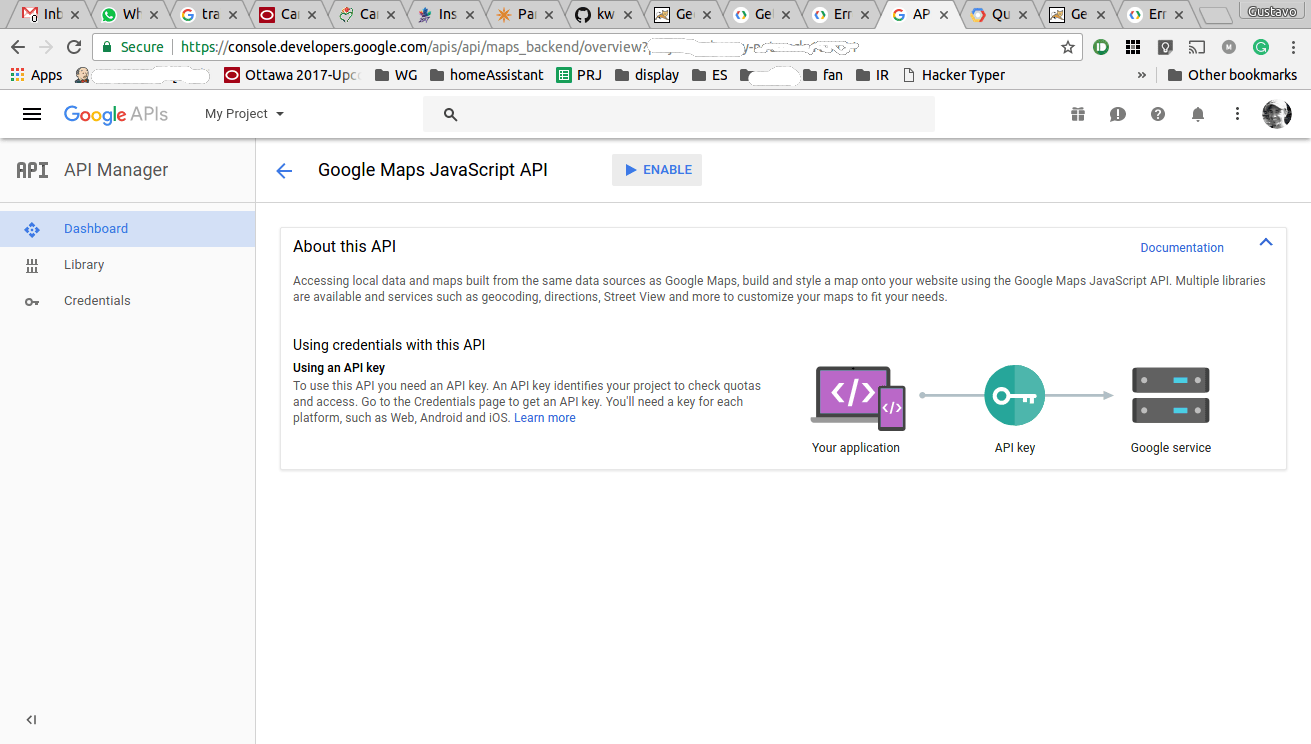
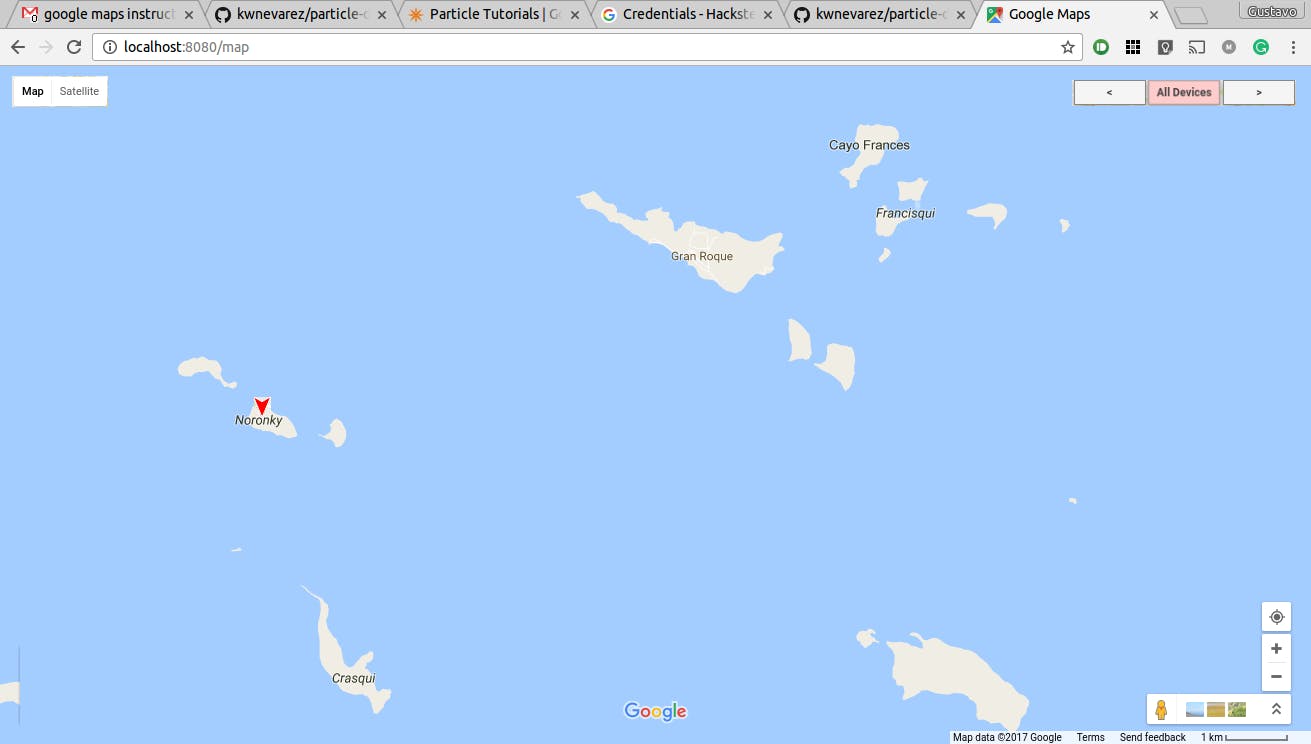
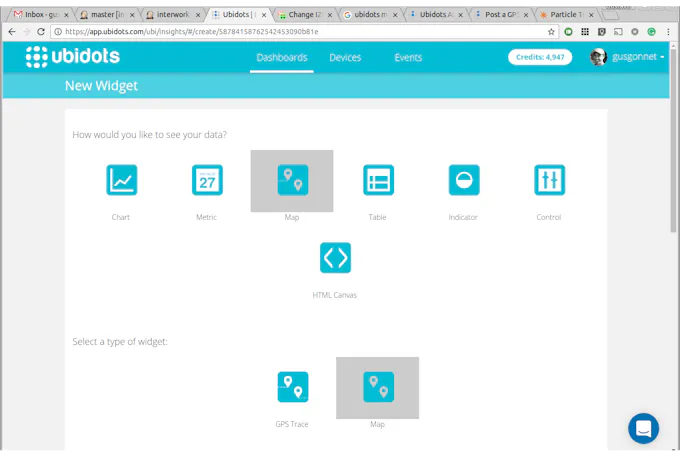
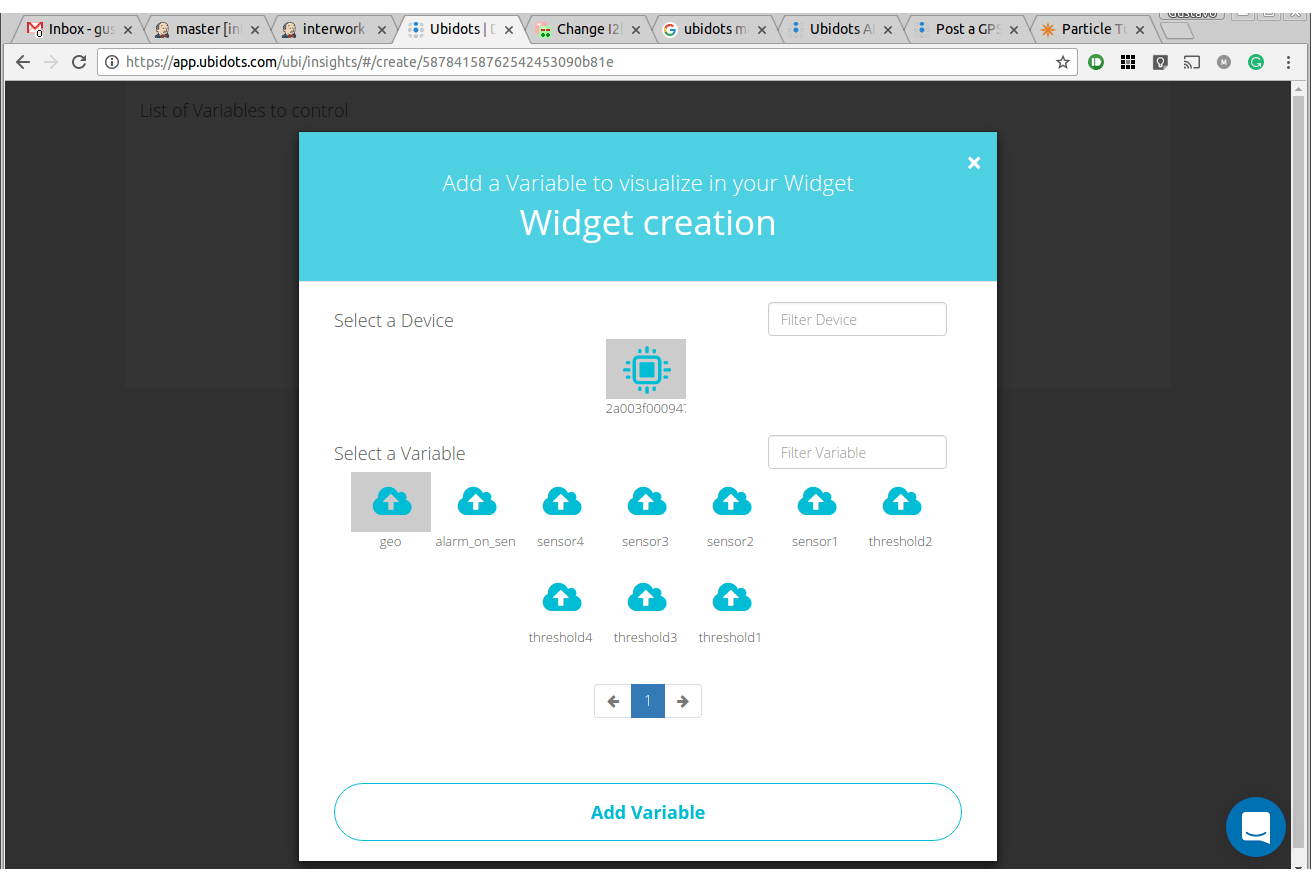
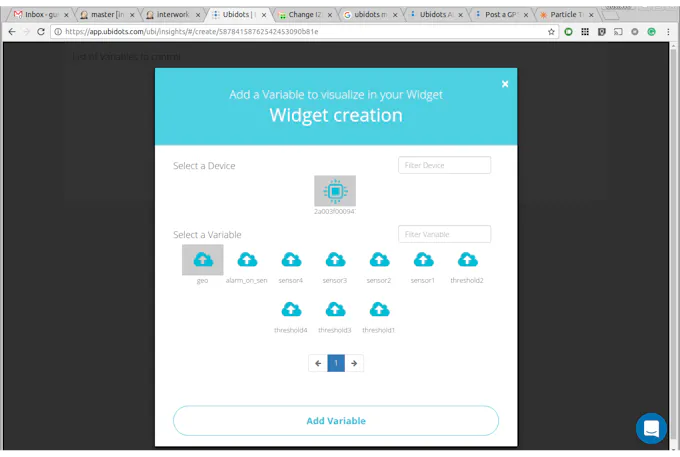
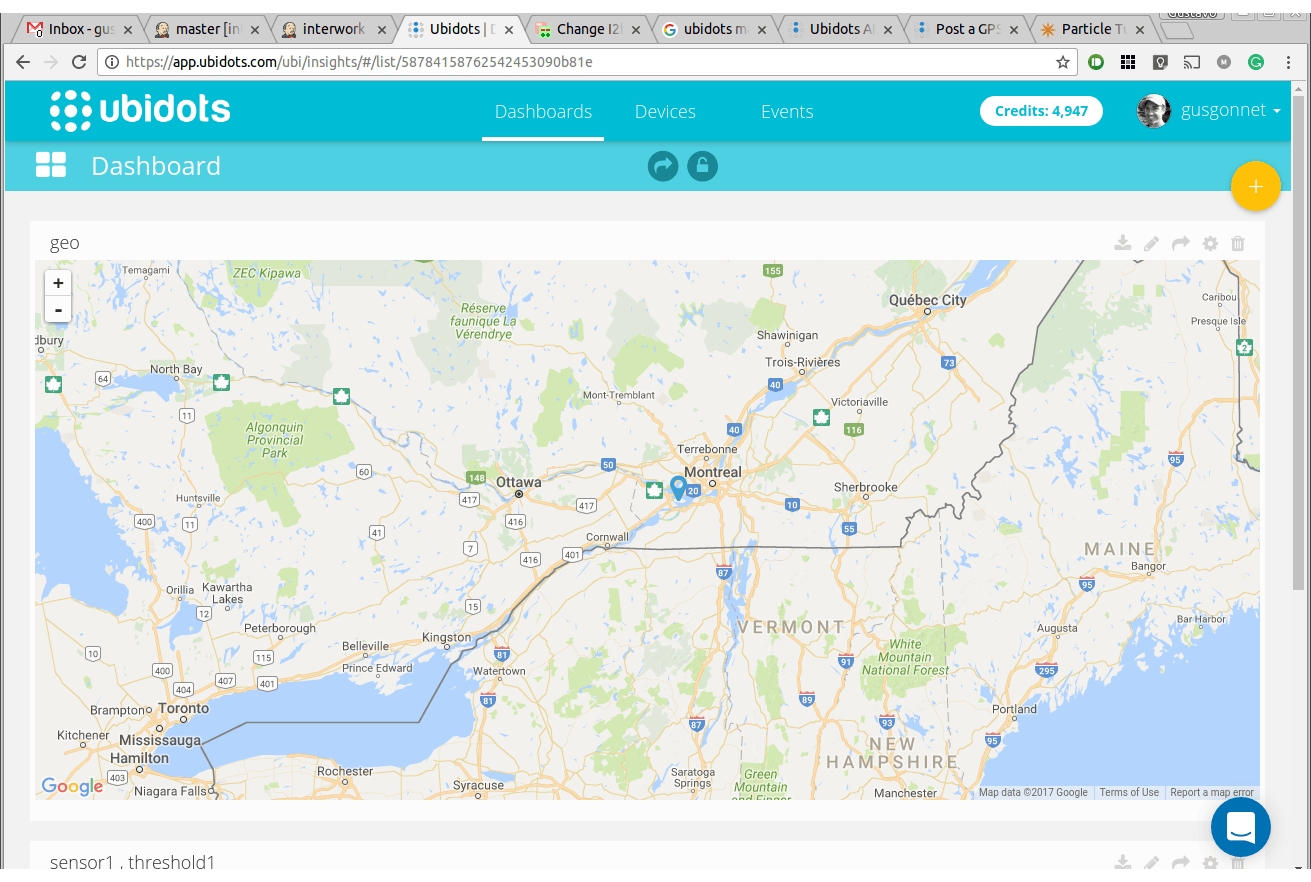
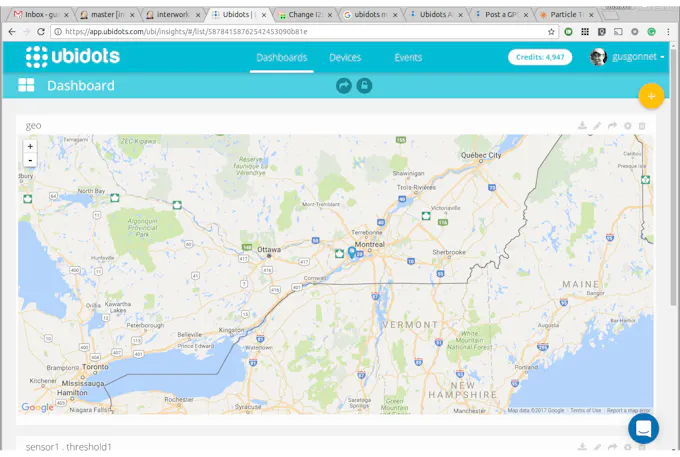
<html> <section class=„section-container“ id=„things“><h2 class=„section-title“><a class=„title-anchor“ href=„https://www.hackster.io/gusgonnet/map-your-particles-e34878?ref=part&ref_id=9500&offset=1#things“><i class=„fa fa-link“/></a>Things used in this project </h2><div class=„section-content“><table class=„sortable-table table table-hover fields-container parts-table“><tbody><tr class=„title“><td colspan=„6“><strong>Hardware components:</strong></td></tr><tr class=„fields part-row“ id=„part-9500“><td class=„part-img“><img src=„https://hackster.imgix.net/uploads/image/file/50450/photon-new-3706595d530dfb95d54f1e0e959e3386.jpg?auto=compress%2Cformat&w=48&h=48&fit=fill&bg=ffffff“ alt=„Photon new“/></td><td><table><tbody><tr><td><a href=„https://www.hackster.io/particle/products/photon“>Particle Photon</a></td></tr><tr><td/></tr></tbody></table></td><td>×</td><td>1</td><td/></tr><tr class=„fields part-row“ id=„part-19589“><td class=„part-img“><img src=„https://hackster.imgix.net/uploads/image/file/126248/Compare-ParticleElectron.jpg?auto=compress%2Cformat&w=48&h=48&fit=fill&bg=ffffff“ alt=„Compare particleelectron“/></td><td><table><tbody><tr><td><a href=„https://www.hackster.io/particle/products/electron“>Particle Electron</a></td></tr><tr><td/></tr></tbody></table></td><td>×</td><td>1</td><td/></tr><tr class=„title“><td colspan=„6“><strong>Software apps and online services:</strong></td></tr><tr class=„fields part-row“ id=„part-43559“><td class=„part-img“/><td><table><tbody><tr><td>Google The Google Maps Geolocation API</td></tr><tr><td/></tr></tbody></table></td><td colspan=„2“/><td><a target=„_blank“ rel=„nofollow“ class=„istooltip“ title=„More info“ href=„https://developers.google.com/maps/documentation/geolocation/intro“><i class=„fa fa-link“/></a></td></tr><tr class=„fields part-row“ id=„part-43560“><td class=„part-img“/><td><table><tbody><tr><td>particle-device-locator</td></tr><tr><td/></tr></tbody></table></td><td colspan=„2“/><td><a target=„_blank“ rel=„nofollow“ class=„istooltip“ title=„More info“ href=„https://github.com/kwnevarez/particle-device-locator“><i class=„fa fa-link“/></a></td></tr><tr class=„fields part-row“ id=„part-17031“><td class=„part-img“><img src=„https://hackster.imgix.net/uploads/image/file/108718/new-google-maps-logo.png?auto=compress%2Cformat&w=48&h=48&fit=fill&bg=ffffff“ alt=„New google maps logo“/></td><td><table><tbody><tr><td><a href=„https://www.hackster.io/google/products/google-maps“>Google Maps</a></td></tr><tr><td/></tr></tbody></table></td><td colspan=„2“/><td><a target=„_blank“ rel=„nofollow“ class=„istooltip“ title=„More info“ href=„https://developers.google.com/maps“><i class=„fa fa-link“/></a></td></tr><tr class=„fields part-row“ id=„part-13319“><td class=„part-img“><img src=„https://hackster.imgix.net/uploads/image/file/81107/ubidots.png?auto=compress%2Cformat&w=48&h=48&fit=fill&bg=ffffff“ alt=„Ubidots“/></td><td><table><tbody><tr><td><a href=„https://www.hackster.io/ubidots/products/ubidots“>Ubidots</a></td></tr><tr><td/></tr></tbody></table></td><td colspan=„2“/><td/></tr></tbody></table></div></section><section class=„section-container collapsed“ id=„about-project“><h2 class=„section-title“><a class=„title-anchor“ href=„https://www.hackster.io/gusgonnet/map-your-particles-e34878?ref=part&ref_id=9500&offset=1#about-project“><i class=„fa fa-link“/></a>Story </h2><div class=„section-content hljs-active hljs-monokai“><div class=„medium-editor“ itemprop=„text“><p>In this write-up I'll tell you everything I learned about the <a href=„https://docs.particle.io/tutorials/integrations/google-maps/“ rel=„nofollow“>Particle integration with Google Maps</a>.</p><h3 id=„toc-wait-a-minute–location-without-gps-0“><a class=„title-anchor“ href=„https://www.hackster.io/gusgonnet/map-your-particles-e34878?ref=part&ref_id=9500&offset=1#toc-wait-a-minute--location-without-gps-0“ rel=„nofollow“><i class=„fa fa-link“/></a>Wait a minute, location without GPS?</h3><p>Yes! We can now find the location of our Particles without needing extra hardware (eg: a GPS module). This is possible because <a href=„https://developers.google.com/maps/documentation/geolocation/intro“ rel=„nofollow“>the Google Maps Geolocation API</a> is able to return a location and an accuracy radius from visible Wi-Fi access points or cells towers. Pretty cool, huh?</p><h3 id=„toc-the-four-common-types-of-geolocation-1“><a class=„title-anchor“ href=„https://www.hackster.io/gusgonnet/map-your-particles-e34878?ref=part&ref_id=9500&offset=1#toc-the-four-common-types-of-geolocation-1“ rel=„nofollow“><i class=„fa fa-link“/></a>The four common types of geolocation</h3><p>Some theory, from the <a href=„https://docs.particle.io/tutorials/integrations/google-maps/#geolocation-basics“ rel=„nofollow“>Particle site</a>:</p><p><strong><em>GPS (GLOBAL POSITIONING SYSTEM):</em></strong><em> The Global Positioning System (GPS) is generally the most accurate and it can provide device location continuously. Under normal conditions, GPS can locate a device with an accuracy of ~4 meters.</em></p><p><strong><em>CELLULAR TOWER LOCATION: </em></strong><em>Every cell tower has an identifier, and this can be looked up using the Google Geolocation API to find its location. This process is fast and provides a general location, usually within 4000 meters or a couple miles.</em></p><p><strong><em>WI-FI LOCATION:</em></strong><em> The Google Maps integration also supports this method of geolocation. Particle Photon and P1 (Wi-Fi) devices can collect visible Wi-Fi access points, and send these to the geolocation API in exchange for its location. Often times, Wi-Fi geolocation is more precise than cellular geolocation, often with an accuracy radius of 50 meters or less.</em></p><p><strong><em>IP ADDRESS LOCATION: </em></strong><em>Particle Wi-Fi devices report their last IP address to the cloud, which could be used for this geolocation method. This is most often the least accurate of the 4 methods described in this section. This technique is not used by the Particle-Google Maps integration.</em></p><p><strong>Recap:</strong> this integration uses WI-FI and cellular tower location.</p><h3 id=„toc-how-to-do-this-2“><a class=„title-anchor“ href=„https://www.hackster.io/gusgonnet/map-your-particles-e34878?ref=part&ref_id=9500&offset=1#toc-how-to-do-this-2“ rel=„nofollow“><i class=„fa fa-link“/></a>How to do this</h3><p>Let's start setting things up.</p><p><strong>STEP 1:</strong> get an API key. Go to <a href=„https://developers.google.com/maps/documentation/geolocation/intro“ rel=„nofollow“>this Google Maps Geolocation API link</a> and hit on the <strong>GET A KEY</strong> button -> create a new project -> enter the name and hit <strong>CREATE AND ENABLE API</strong>.</p><div data-react-class=„ImageCarousel“ data-react-props=„{"images":[{"caption":"Get a key, create a new project and hit CREATE AND ENABLE API","id":306928,"image_urls":{"headline_url":"https://hackster.imgix.net/uploads/attachments/306928/screenshot_from_2017-05-22_213639_8WV8RfhnJ5.png?auto=compress%2Cformat\u0026w=680\u0026h=510\u0026fit=max","lightbox_url":"https://hackster.imgix.net/uploads/attachments/306928/screenshot_from_2017-05-22_213639_8WV8RfhnJ5.png?auto=compress%2Cformat\u0026w=1280\u0026h=960\u0026fit=max"},"position":0},{"caption":"You'll need that key","id":306929,"image_urls":{"headline_url":"https://hackster.imgix.net/uploads/attachments/306929/screenshot_from_2017-05-22_213704_BalWEM6sI0.png?auto=compress%2Cformat\u0026w=680\u0026h=510\u0026fit=max","lightbox_url":"https://hackster.imgix.net/uploads/attachments/306929/screenshot_from_2017-05-22_213704_BalWEM6sI0.png?auto=compress%2Cformat\u0026w=1280\u0026h=960\u0026fit=max"},"position":1}],"uid":"00ae739aaa"}“><div data-reactroot=„“ data-reactid=„1“ data-react-checksum=„327711553“><div class=„image_carouselcontainer_hMJxn“ data-reactid=„2“><div class=„image_carouselwrapper_102VA“ data-reactid=„3“><div class=„image_carouselscrollContainer_3mmPE “ data-reactid=„14“><div class=„image_carouselimageContainer_22WPm“ data-reactid=„18“><div class=„image_carouselimageWrapper_39AG2“ data-reactid=„19“><img class=„image_carouselimage_2-CjO “ src=„https://hackster.imgix.net/uploads/attachments/306928/screenshot_from_2017-05-22_213639_8WV8RfhnJ5.png?auto=compress%2Cformat&w=680&h=510&fit=max“ data-reactid=„20“/></div></div></div></div><div class=„image_carouselcaption_2sZrD“ data-reactid=„24“>1 / 2 • You'll need that key</div></div></div></div><p>To check your API keys, hit the <a href=„https://console.developers.google.com/apis/credentials“ rel=„nofollow“>Google Developer Credentials Console</a> at any time.</p><p>If you get lost follow <a href=„https://docs.particle.io/tutorials/integrations/google-maps/#get-a-google-geolocation-api-key“ rel=„nofollow“>the Particle docs here</a>.</p><p><strong>Step 2:</strong> create the Particle-Google Maps integration <a href=„https://console.particle.io/integrations“ rel=„nofollow“>on this link</a>. You'll need the api key you got on step 1.</p><p>To ensure things are OK so far, hit the <strong>TEST</strong> button. You should get a <strong>Success</strong> popup at the bottom right.</p><div data-react-class=„ImageCarousel“ data-react-props=„{"images":[{"caption":"","id":306930,"image_urls":{"headline_url":"https://hackster.imgix.net/uploads/attachments/306930/screenshot_from_2017-05-19_175332b_EicyhJizR2.png?auto=compress%2Cformat\u0026w=680\u0026h=510\u0026fit=max","lightbox_url":"https://hackster.imgix.net/uploads/attachments/306930/screenshot_from_2017-05-19_175332b_EicyhJizR2.png?auto=compress%2Cformat\u0026w=1280\u0026h=960\u0026fit=max"},"position":0}],"uid":"f911a3186e"}“><div data-reactroot=„“ data-reactid=„1“ data-react-checksum=„-1164643601“><div class=„image_carouselcontainer_hMJxn“ data-reactid=„2“><div class=„image_carouselwrapper_102VA“ data-reactid=„3“><div class=„image_carouselscrollContainer_3mmPE “ data-reactid=„4“><div class=„image_carouselimageContainer_22WPm“ data-reactid=„5“><div class=„image_carouselimageWrapper_39AG2“ data-reactid=„6“><img class=„image_carouselimage_2-CjO “ src=„https://hackster.imgix.net/uploads/attachments/306930/screenshot_from_2017-05-19_175332b_EicyhJizR2.png?auto=compress%2Cformat&w=680&h=510&fit=max“ data-reactid=„7“/></div></div></div></div><!– react-text: 8 –><!– /react-text –></div></div></div><p>Again, in case of trouble check <a href=„https://docs.particle.io/tutorials/integrations/google-maps/#particle-console“ rel=„nofollow“>the Particle docs</a>.</p><p><strong>Step 3:</strong> flash your particle with the code <a href=„https://github.com/gusgonnet/googleMapsUbidots“ rel=„nofollow“>on this repo</a>.</p><p>Now let's map it! There are many options to do this. In the following sections we'll explore a couple of them.</p><h3 id=„toc-map-it-on-particle-device-locator-3“><a class=„title-anchor“ href=„https://www.hackster.io/gusgonnet/map-your-particles-e34878?ref=part&ref_id=9500&offset=1#toc-map-it-on-particle-device-locator-3“ rel=„nofollow“><i class=„fa fa-link“/></a>Map it on particle device locator</h3><p>In this section we'll use <a href=„https://github.com/kwnevarez/particle-device-locator“ rel=„nofollow“>the particle device locator</a>.</p><p><strong>Step a:</strong> Install the <a href=„https://cloud.google.com/sdk/“ rel=„nofollow“>Google Cloud SDK</a>.</p><p><strong>Step b:</strong> once you installed the SDK, set it up by running in a console:</p><pre>gcloud init </pre><p><strong>Step c:</strong> authenticate your SDK with the Google Cloud Platform:</p><pre>gcloud beta auth application-default login </pre><p><strong>Step d:</strong> clone the repo:</p><pre>git clone https://github.com/kwnevarez/particle-device-locator </pre><p>Note: If the previous command fails, it may mean that you don't have git installed on your computer. Please use <a href=„https://git-scm.com/“ rel=„nofollow“>this link</a> to install it. Once finished, run the command again.</p><p><strong>Step e:</strong> install the dependencies:</p><pre>cd particle-device-locator npm install </pre><p>Note: If the previous command fails, it may mean that you don't have npm or nodeJS installed on your computer. Please use <a href=„https://nodejs.org/en/“ rel=„nofollow“>this link</a> and <a href=„https://www.npmjs.com/“ rel=„nofollow“>this link </a>to install them. Once finished, run the command again.</p><p><strong>Step f:</strong> configure it, by entering in <a href=„http://config.json/“ rel=„nofollow“>config.json</a> the api key you got in step 1:</p><pre>cd particle-device-locator vi config.json </pre><p>Note: <a href=„https://en.wikipedia.org/wiki/Vi“ rel=„nofollow“>vi</a> is a command line editor. If you don't have ti around you can use <a href=„https://en.wikipedia.org/wiki/Microsoft_Notepad“ rel=„nofollow“>notepad</a>, <a href=„https://www.nano-editor.org/dist/v2.2/nano.html“ rel=„nofollow“>nano</a>, or anything you like to edit the config.json file.</p><p>It should end up looking like this:</p><pre>{


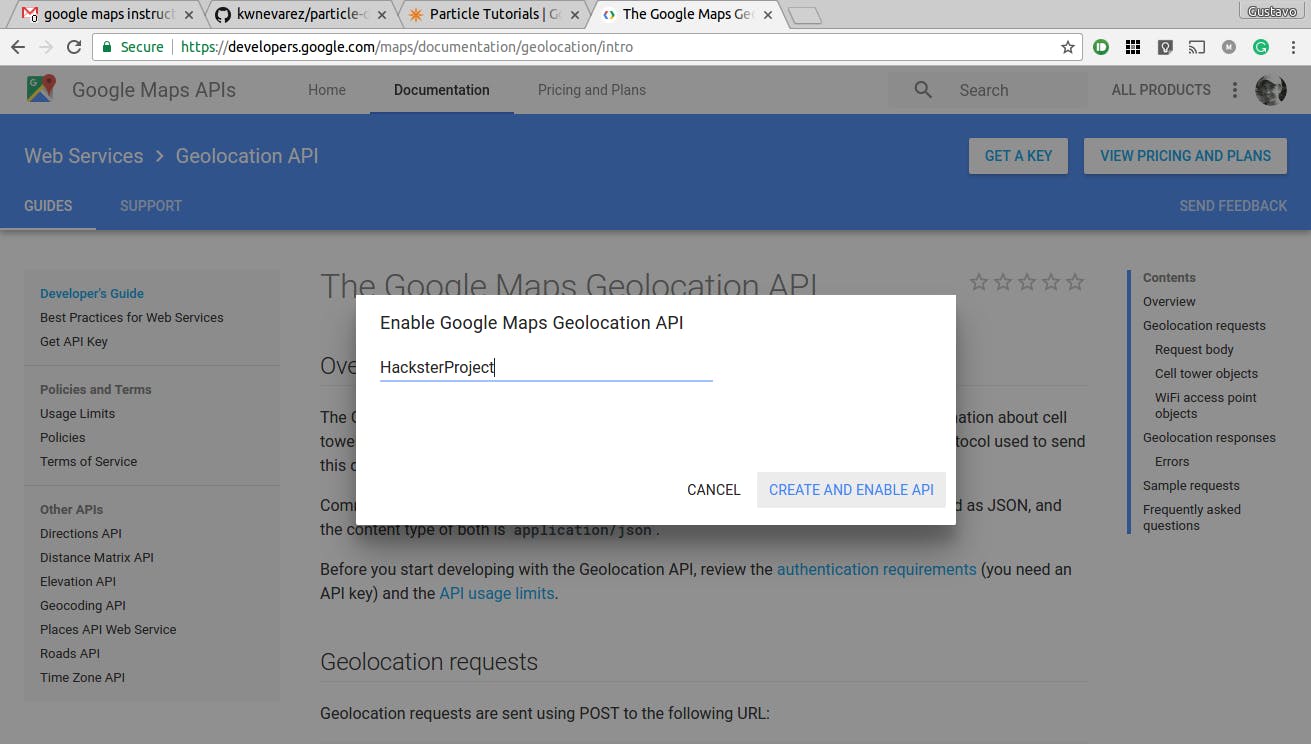
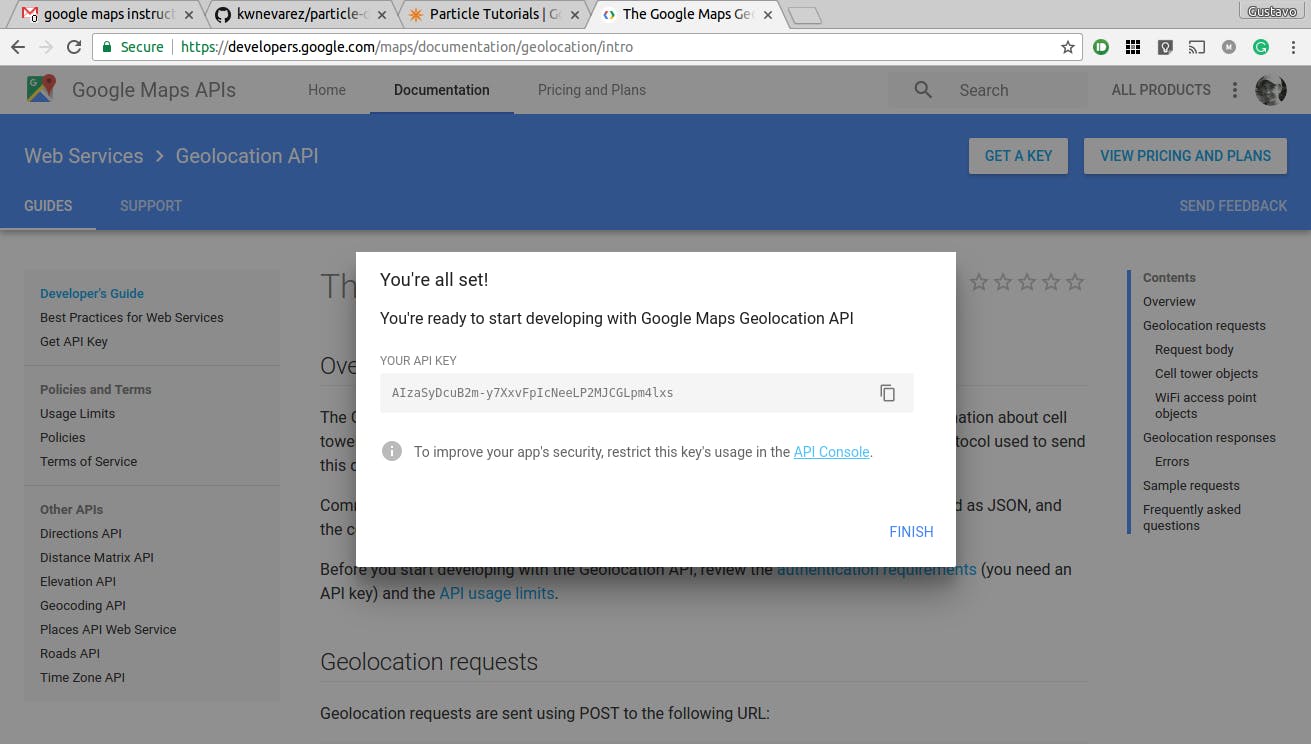
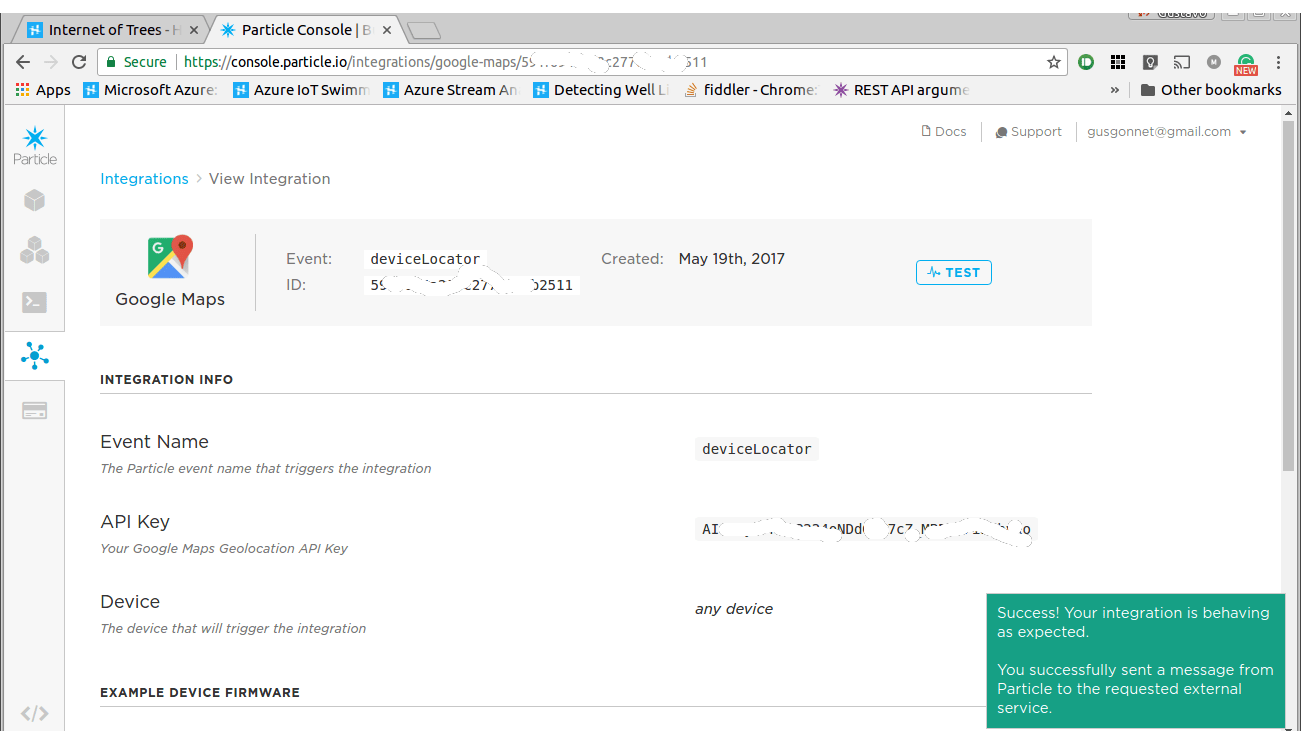
 "map_api_key": "AIzaSyDcuB2m-y7XxvFpIcNeeLP2MJCGLpm4lxs",
 "event_name": "deviceLocator"
} </pre><p>HINT: use your api key, not mine (mine won't work - it's deactivated already…)</p><p><strong>Step g:</strong> on the <a href=„https://console.developers.google.com/apis/credentials“ rel=„nofollow“>Google Developer Credentials Console</a>, enable the google maps javascript API . It looks like this:</p><div data-react-class=„ImageCarousel“ data-react-props=„{"images":[{"caption":"You want to enable that JavaScript API","id":306932,"image_urls":{"headline_url":"https://hackster.imgix.net/uploads/attachments/306932/screenshot_from_2017-05-19_185258b_uzqAZgPDFL.png?auto=compress%2Cformat\u0026w=680\u0026h=510\u0026fit=max","lightbox_url":"https://hackster.imgix.net/uploads/attachments/306932/screenshot_from_2017-05-19_185258b_uzqAZgPDFL.png?auto=compress%2Cformat\u0026w=1280\u0026h=960\u0026fit=max"},"position":0},{"caption":"Just hit that ENABLE button on top","id":306933,"image_urls":{"headline_url":"https://hackster.imgix.net/uploads/attachments/306933/screenshot_from_2017-05-19_185305b_AgjyAGz9MN.png?auto=compress%2Cformat\u0026w=680\u0026h=510\u0026fit=max","lightbox_url":"https://hackster.imgix.net/uploads/attachments/306933/screenshot_from_2017-05-19_185305b_AgjyAGz9MN.png?auto=compress%2Cformat\u0026w=1280\u0026h=960\u0026fit=max"},"position":1}],"uid":"1d051acad4"}“><div data-reactroot=„“ data-reactid=„1“ data-react-checksum=„-218595482“><div class=„image_carouselcontainer_hMJxn“ data-reactid=„2“><div class=„image_carouselwrapper_102VA“ data-reactid=„3“><div class=„image_carouselscrollContainer_3mmPE “ data-reactid=„14“><div class=„image_carouselimageContainer_22WPm“ data-reactid=„18“><div class=„image_carouselimageWrapper_39AG2“ data-reactid=„19“><img class=„image_carouselimage_2-CjO “ src=„https://hackster.imgix.net/uploads/attachments/306932/screenshot_from_2017-05-19_185258b_uzqAZgPDFL.png?auto=compress%2Cformat&w=680&h=510&fit=max“ data-reactid=„20“/></div></div></div></div><div class=„image_carouselcaption_2sZrD“ data-reactid=„24“>1 / 2 • Just hit that ENABLE button on top</div></div></div></div><p><strong>Step h:</strong> run it:</p><pre>npm install </pre><p><strong>Step i:</strong> open it at <a href=„http://localhost:8080/“ rel=„nofollow“>http://localhost:8080</a>. After logging it with your Particle credentials, you should be facing a map. Hitting <strong>All devices</strong> on the top right maps your particles with a red arrow like this:</p><div data-react-class=„ImageCarousel“ data-react-props=„{"images":[{"caption":"Los Roques, Venezuela, oh how I wish I were writing this article from those beaches…","id":306935,"image_urls":{"headline_url":"https://hackster.imgix.net/uploads/attachments/306935/losroques_i2G44HW3FP.png?auto=compress%2Cformat\u0026w=680\u0026h=510\u0026fit=max","lightbox_url":"https://hackster.imgix.net/uploads/attachments/306935/losroques_i2G44HW3FP.png?auto=compress%2Cformat\u0026w=1280\u0026h=960\u0026fit=max"},"position":0},{"caption":"You should visit this place (yes my photon is in that green bag)","id":306937,"image_urls":{"headline_url":"https://hackster.imgix.net/uploads/attachments/306937/los_roques_bajo_fabian_Ik35tj386k.jpg?auto=compress%2Cformat\u0026w=680\u0026h=510\u0026fit=max","lightbox_url":"https://hackster.imgix.net/uploads/attachments/306937/los_roques_bajo_fabian_Ik35tj386k.jpg?auto=compress%2Cformat\u0026w=1280\u0026h=960\u0026fit=max"},"position":1}],"uid":"36dc3fa1f4"}“><div data-reactroot=„“ data-reactid=„1“ data-react-checksum=„98140935“><div class=„image_carouselcontainer_hMJxn“ data-reactid=„2“><div class=„image_carouselwrapper_102VA“ data-reactid=„3“><div class=„image_carouselscrollContainer_3mmPE “ data-reactid=„14“><div class=„image_carouselimageContainer_22WPm“ data-reactid=„18“><div class=„image_carouselimageWrapper_39AG2“ data-reactid=„19“><img class=„image_carouselimage_2-CjO “ src=„https://hackster.imgix.net/uploads/attachments/306935/losroques_i2G44HW3FP.png?auto=compress%2Cformat&w=680&h=510&fit=max“ data-reactid=„20“/></div></div></div></div><div class=„image_carouselcaption_2sZrD“ data-reactid=„24“>1 / 2 • You should visit this place (yes my photon is in that green bag)</div></div></div></div><h3 id=„toc-map-it-on-ubidots-4“><a class=„title-anchor“ href=„https://www.hackster.io/gusgonnet/map-your-particles-e34878?ref=part&ref_id=9500&offset=1#toc-map-it-on-ubidots-4“ rel=„nofollow“><i class=„fa fa-link“/></a>Map it on Ubidots</h3><p>In this section we'll use <a href=„https://ubidots.com/“ rel=„nofollow“>Ubidots</a>.</p><p><strong>Step a: </strong>flash the attached code (maps.ino) in your Particle or add a publish like this in your locationCallback() function:</p><pre> Particle.publish(„ubidotsLatLong“, „{\“ubi-dsl-vl\„:\“„ + Particle.deviceID() + “/„ + name + „\“, \“ubi-token\„:\“„ + ubidotsToken + „\“, \“ubi-value\„:\“„ + value + „\“ , \“google-lat\„:\“„ + lat + „\“ , \“google-lng\„:\“„ + lon + „\“}“, 60, PRIVATE);

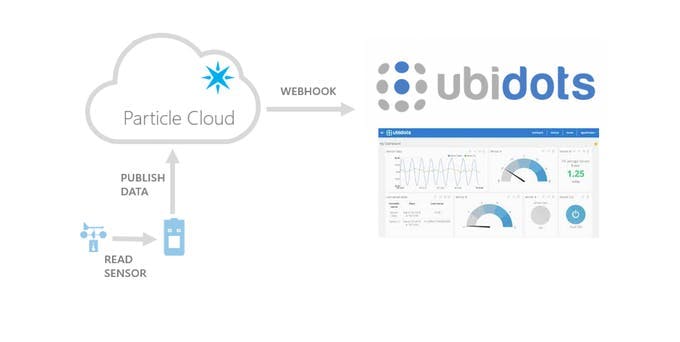
</pre><p><strong>Step b:</strong> setup a webhook hitting the Ubidots HTTPS API. Go to <a href=„https://console.particle.io/integrations“ rel=„nofollow“>the particle integrations</a> and hit NEW INTEGRATION. This is the webhook information:</p><ul><li><strong>Event name:</strong> ubidotsLatLong</li></ul><ul><li><strong>url:</strong> <a href=„https://things.ubidots.com/api/v1.6/devices/%7B%7Bubi-dsl-vl%7D%7D/values/?token=ubi-token“ rel=„nofollow“>https://things.ubidots.com/api/v1.6/devices/ubi-dsl-vl/values/?token=ubi-token</a></li></ul><ul><li><strong>Request type:</strong> POST</li></ul><ul><li><strong>Device:</strong> Any</li></ul><ul><li><strong>Advanced settings:</strong></li></ul><ul><li><strong>Send custom data:</strong> JSON</li></ul><p>And then enter:</p><pre> {
    "value": "{{ubi-value}}",
    "context": {
      "lat": " {{google-lat}}",
      "lng": "{{google-lng}}"
    }
  }
</pre><ul><li><strong>include default data:</strong> no</li></ul><ul><li><strong>enforce ssl:</strong> yes</li></ul><p>This is what the webhook is doing for us:</p><div data-react-class=„ImageCarousel“ data-react-props=„{"images":[{"caption":"The webhook is sending lat/long coordinates to Ubidots","id":307112,"image_urls":{"headline_url":"https://hackster.imgix.net/uploads/attachments/307112/particlecloudubidots_a6r4tmczu5_fHm6aNcTqe.jpg?auto=compress%2Cformat\u0026w=680\u0026h=510\u0026fit=max","lightbox_url":"https://hackster.imgix.net/uploads/attachments/307112/particlecloudubidots_a6r4tmczu5_fHm6aNcTqe.jpg?auto=compress%2Cformat\u0026w=1280\u0026h=960\u0026fit=max"},"position":0}],"uid":"e13bf5a143"}“><div data-reactroot=„“ data-reactid=„1“ data-react-checksum=„638334327“><div class=„image_carouselcontainer_hMJxn“ data-reactid=„2“><div class=„image_carouselwrapper_102VA“ data-reactid=„3“><div class=„image_carouselscrollContainer_3mmPE “ data-reactid=„4“><div class=„image_carouselimageContainer_22WPm“ data-reactid=„5“><div class=„image_carouselimageWrapper_39AG2“ data-reactid=„6“><img class=„image_carouselimage_2-CjO “ src=„https://hackster.imgix.net/uploads/attachments/307112/particlecloudubidots_a6r4tmczu5_fHm6aNcTqe.jpg?auto=compress%2Cformat&w=680&h=510&fit=max“ data-reactid=„7“/></div></div></div></div><div class=„image_carouselcaption_2sZrD“ data-reactid=„8“><!– react-text: 10 –><!– /react-text –>The webhook is sending lat/long coordinates to Ubidots</div></div></div></div><p><strong>Step c:</strong> Get an account on <a href=„https://ubidots.com/“ rel=„nofollow“>Ubidots</a>. You can start using <a href=„https://ubidots.com/pricing“ rel=„nofollow“>it for free</a>.</p><p><strong>Step d:</strong> Create a dashboard by hitting the Dashboard tab on top and then hitting the yellow + to add a dashboard.</p><p><strong>Step e:</strong> Add a new map widget (note the button on the top right corner):</p><div data-react-class=„ImageCarousel“ data-react-props=„{"images":[{"caption":"Adding a map widget","id":307115,"image_urls":{"headline_url":"https://hackster.imgix.net/uploads/attachments/307115/screenshot_from_2017-05-23_131258_z7Y5B043UR.png?auto=compress%2Cformat\u0026w=680\u0026h=510\u0026fit=max","lightbox_url":"https://hackster.imgix.net/uploads/attachments/307115/screenshot_from_2017-05-23_131258_z7Y5B043UR.png?auto=compress%2Cformat\u0026w=1280\u0026h=960\u0026fit=max"},"position":0}],"uid":"f8278004f7"}“><div data-reactroot=„“ data-reactid=„1“ data-react-checksum=„-1952504554“><div class=„image_carouselcontainer_hMJxn“ data-reactid=„2“><div class=„image_carouselwrapper_102VA“ data-reactid=„3“><div class=„image_carouselscrollContainer_3mmPE “ data-reactid=„4“><div class=„image_carouselimageContainer_22WPm“ data-reactid=„5“><div class=„image_carouselimageWrapper_39AG2“ data-reactid=„6“><img class=„image_carouselimage_2-CjO “ src=„https://hackster.imgix.net/uploads/attachments/307115/screenshot_from_2017-05-23_131258_z7Y5B043UR.png?auto=compress%2Cformat&w=680&h=510&fit=max“ data-reactid=„7“/></div></div></div></div><div class=„image_carouselcaption_2sZrD“ data-reactid=„8“><!– react-text: 10 –><!– /react-text –>Adding a map widget</div></div></div></div><p><strong>Step f:</strong> select the <strong>geo</strong> variable on the device that is sending this data and hit on Add variable then Finish</p><div data-react-class=„ImageCarousel“ data-react-props=„{"images":[{"caption":"Select the variable with lat/long coordinates info","id":307117,"image_urls":{"headline_url":"https://hackster.imgix.net/uploads/attachments/307117/screenshot_from_2017-05-23_131239_Krq4LgAKAh.png?auto=compress%2Cformat\u0026w=680\u0026h=510\u0026fit=max","lightbox_url":"https://hackster.imgix.net/uploads/attachments/307117/screenshot_from_2017-05-23_131239_Krq4LgAKAh.png?auto=compress%2Cformat\u0026w=1280\u0026h=960\u0026fit=max"},"position":0}],"uid":"470b71e983"}“><div data-reactroot=„“ data-reactid=„1“ data-react-checksum=„64762274“><div class=„image_carouselcontainer_hMJxn“ data-reactid=„2“><div class=„image_carouselwrapper_102VA“ data-reactid=„3“><div class=„image_carouselscrollContainer_3mmPE “ data-reactid=„4“><div class=„image_carouselimageContainer_22WPm“ data-reactid=„5“><div class=„image_carouselimageWrapper_39AG2“ data-reactid=„6“><img class=„image_carouselimage_2-CjO “ src=„https://hackster.imgix.net/uploads/attachments/307117/screenshot_from_2017-05-23_131239_Krq4LgAKAh.png?auto=compress%2Cformat&w=680&h=510&fit=max“ data-reactid=„7“/></div></div></div></div><div class=„image_carouselcaption_2sZrD“ data-reactid=„8“><!– react-text: 10 –><!– /react-text –>Select the variable with lat/long coordinates info</div></div></div></div><p><strong>Step g:</strong> Enjoy looking at the location of your Particle:</p><div data-react-class=„ImageCarousel“ data-react-props=„{"images":[{"caption":"It's right there!","id":307118,"image_urls":{"headline_url":"https://hackster.imgix.net/uploads/attachments/307118/screenshot_from_2017-05-23_131415_m1LI2v9nzk.png?auto=compress%2Cformat\u0026w=680\u0026h=510\u0026fit=max","lightbox_url":"https://hackster.imgix.net/uploads/attachments/307118/screenshot_from_2017-05-23_131415_m1LI2v9nzk.png?auto=compress%2Cformat\u0026w=1280\u0026h=960\u0026fit=max"},"position":0}],"uid":"cec16dfcb2"}“><div data-reactroot=„“ data-reactid=„1“ data-react-checksum=„-1335286242“><div class=„image_carouselcontainer_hMJxn“ data-reactid=„2“><div class=„image_carouselwrapper_102VA“ data-reactid=„3“><div class=„image_carouselscrollContainer_3mmPE “ data-reactid=„4“><div class=„image_carouselimageContainer_22WPm“ data-reactid=„5“><div class=„image_carouselimageWrapper_39AG2“ data-reactid=„6“><img class=„image_carouselimage_2-CjO “ src=„https://hackster.imgix.net/uploads/attachments/307118/screenshot_from_2017-05-23_131415_m1LI2v9nzk.png?auto=compress%2Cformat&w=680&h=510&fit=max“ data-reactid=„7“/></div></div></div></div><div class=„image_carouselcaption_2sZrD“ data-reactid=„8“><!– react-text: 10 –><!– /react-text –>It's right there!</div></div></div></div><h3 id=„toc-references-5“><a class=„title-anchor“ href=„https://www.hackster.io/gusgonnet/map-your-particles-e34878?ref=part&ref_id=9500&offset=1#toc-references-5“ rel=„nofollow“><i class=„fa fa-link“/></a>References</h3><p>These links help me get started on Ubidots:</p><ul><li><a href=„https://ubidots.com/docs/es/get_started/quickstart/tutorial_geopoint.html“ rel=„nofollow“>Post a GPS coordinate using curl</a></li></ul><ul><li><a href=„https://ubidots.com/docs/api/index.html#send-values“ rel=„nofollow“>Ubidots API</a></li></ul><h3 id=„toc-conclusion-6“><a class=„title-anchor“ href=„https://www.hackster.io/gusgonnet/map-your-particles-e34878?ref=part&ref_id=9500&offset=1#toc-conclusion-6“ rel=„nofollow“><i class=„fa fa-link“/></a>Conclusion</h3><p>Particle, Google Maps and Ubidots made it really easy to put our projects on a map, without needing to add a GPS to our hardware. Impressive! </p><h3 id=„toc-need-help-7“><a class=„title-anchor“ href=„https://www.hackster.io/gusgonnet/map-your-particles-e34878?ref=part&ref_id=9500&offset=1#toc-need-help-7“ rel=„nofollow“><i class=„fa fa-link“/></a>Need help?</h3><p>If you require professional help with your projects, don't hesitate to write me a line about your needs at <a href=„http://gusgonnet@gmail.com/“ rel=„nofollow“>gusgonnet@gmail.com.</a> Thank you!</p></div></div><div class=„read-more“><a class=„btn btn-primary“ href=„javascript:void(0)“>Read more</a></div></section><section class=„section-container“ id=„code“><h2 class=„section-title“><a class=„title-anchor“ href=„https://www.hackster.io/gusgonnet/map-your-particles-e34878?ref=part&ref_id=9500&offset=1#code“><i class=„fa fa-link“/></a>Code </h2></section><section class=„section-container“ id=„team“><h2 class=„section-title“><a class=„title-anchor“ href=„https://www.hackster.io/gusgonnet/map-your-particles-e34878?ref=part&ref_id=9500&offset=1#team“><i class=„fa fa-link“/></a>Credits</h2><div class=„section-content“><div class=„member-thumb“>Thanks to Winston Ford.</div></div></section><section class=„section-container“ id=„replicas“><h2 class=„section-title“><a class=„title-anchor“ href=„https://www.hackster.io/gusgonnet/map-your-particles-e34878?ref=part&ref_id=9500&offset=1#replicas“><i class=„fa fa-link“/></a>Replications</h2><div class=„section-content“><p>Did you replicate this project? Share it!</p><a class=„btn btn-primary btn-sm reactPortal“ action=„SigninDialog“ data-container=„body“ data-redirect-to=„/gusgonnet/map-your-particles-e34878“ data-source=„replica“ data-react=„{"currentPanel":"signup","simplified":true}“ href=„https://www.hackster.io/users/sign_up?id=41438&m=base_article&reason=replica&redirect_to=%2Fgusgonnet%2Fmap-your-particles-e34878“><i class=„fa fa-retweet“/>I made one</a></div></section><section class=„section-container project-feedback-form“/><section class=„section-container“ id=„comments“><h2 class=„section-title“><a class=„title-anchor“ href=„https://www.hackster.io/gusgonnet/map-your-particles-e34878?ref=part&ref_id=9500&offset=1#comments“><i class=„fa fa-link“/></a>Comments </h2></section> </html>
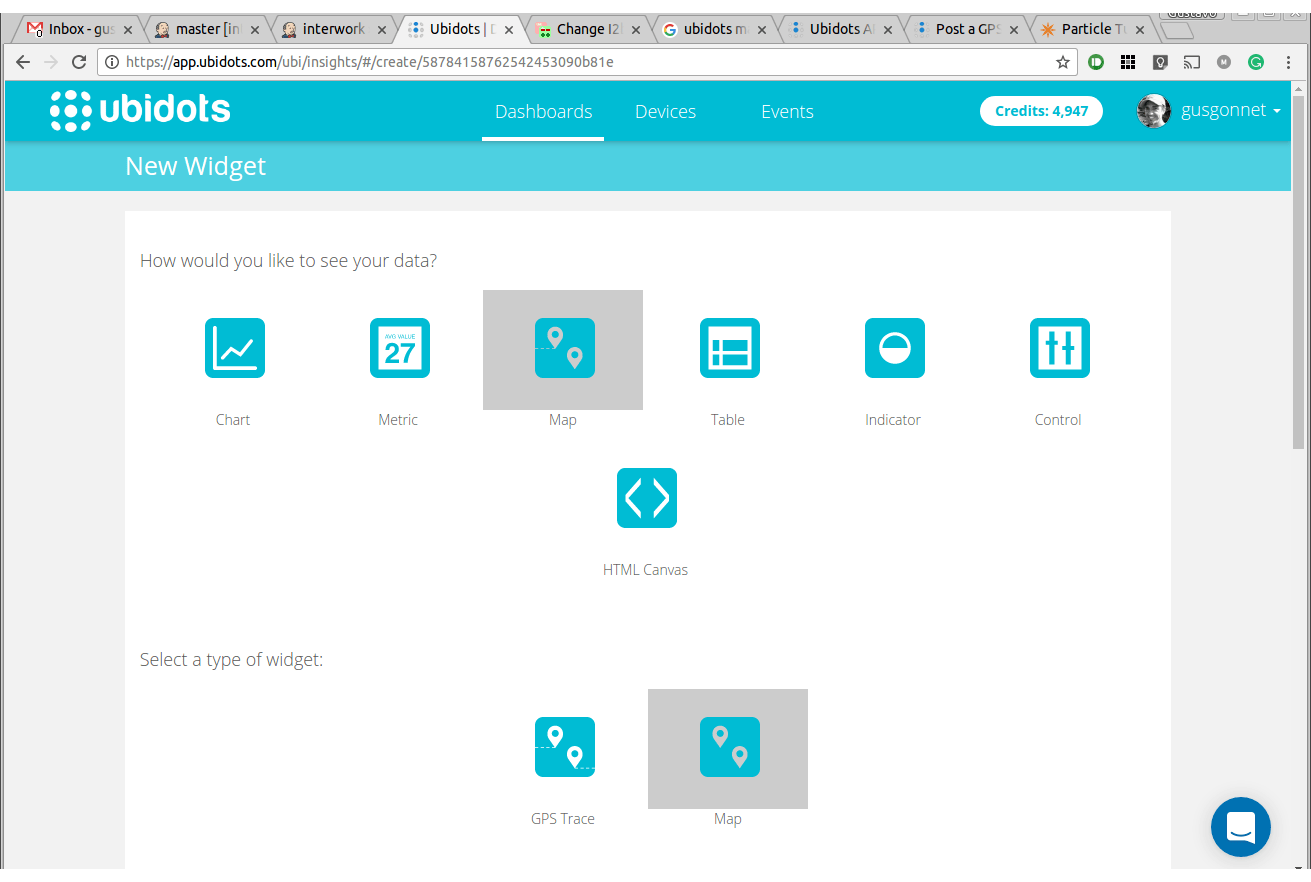
 Falls nicht anders bezeichnet, ist der Inhalt dieses Wikis unter der folgenden Lizenz veröffentlicht: CC Attribution-Noncommercial-Share Alike 4.0 International