Monitor Network Traffic per Process with Nethogs
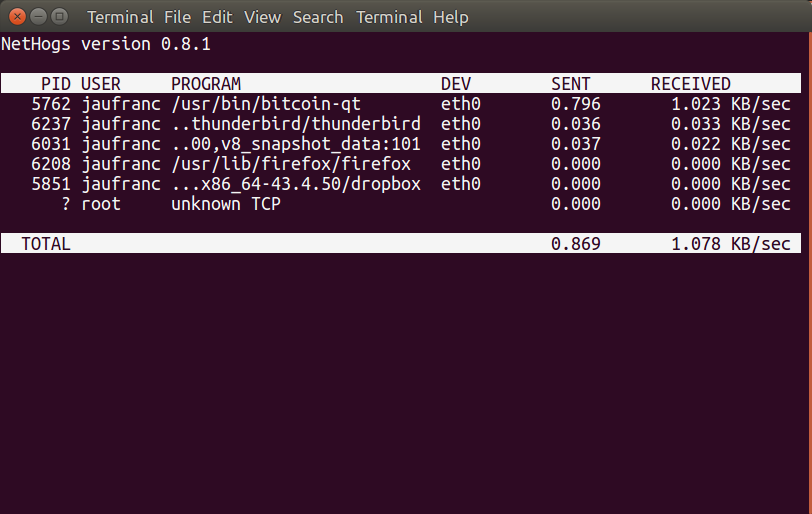
<html> <div id=„main“> <div id=„postpath“><a title=„Go to homepage“ href=„https://www.cnx-software.com/“>Home</a> > <a href=„https://www.cnx-software.com/category/os/linux/“ rel=„category tag“>Linux</a>, <a href=„https://www.cnx-software.com/category/os/ubuntu-os/“ rel=„category tag“>Ubuntu</a> > Monitor Network Traffic per Process with Nethogs</div> <div class=„post“ id=„post-54073“> <h2>Monitor Network Traffic per Process with Nethogs</h2> <div class=„info“>February 12th, 2018 <a href=„https://www.cnx-software.com/author/cnxsoft/“ title=„Posts by cnxsoft“ rel=„author“>cnxsoft</a> <a href=„https://www.cnx-software.com/2018/02/12/monitor-network-traffic-per-process-with-nethogs/#respond“>Leave a comment</a> <a href=„https://www.cnx-software.com/2018/02/12/monitor-network-traffic-per-process-with-nethogs/#comments“>Go to comments</a> <div class=„fixed“/> </div> <div class=„gcacheb gcacheb-1 gcacheb-single acacheb-79 c1“><img src=„https://www.cnx-software.com/wp-content/uploads/2017/12/buy-orange-pi-sbc.gif“ width=„728“ height=„90“ alt=„Orange Pi Development Boards“ usemap=„#orangepimap“/><map name=„orangepimap“><area shape=„rect“ coords=„578,46,698,69“ href=„https://www.aliexpress.com/store/1553371?spm=2114.12010108.0.0.3d1b63dahbBINV“ rel=„nofollow“ title=„Click to Buy Orange Pi Development Boards“ target=„_blank“/><area shape=„rect“ coords=„0,0,728,90“ href=„http://www.orangepi.org/“ rel=„nofollow“ target=„_blank“/></map></div> <div class=„content“> <div class=„c2“><a href=„https://twitter.com/share“ class=„twitter-share-button“ data-count=„vertical“ data-url=„https://www.cnx-software.com/2018/02/12/monitor-network-traffic-per-process-with-nethogs/“>Tweet</a></div> <p>Yesterday I wrote about using <a href=„https://www.cnx-software.com/2018/02/11/how-to-use-3g-and-gps-on-raspberry-pi-with-thaieasyelec-3g-hat-expansion-board/#comment-551666“>3G on Raspberry Pi board</a>,  and one of the commenter mentioned higher traffic than expected when connecting to 3G to just send a few bytes before disconnecting. One of the reasons are the extra data needed if you transmit data over a secure connection, for example establishing a PPP connection, connect to the board over SSH, and disconnect, results in the transmission & reception of a few kilobytes on my board:<br/></p> <div id=„crayon-5a8d11db86b32696168211“ class=„crayon-syntax crayon-theme-classic crayon-font-monaco crayon-os-pc print-yes notranslate c8“ data-settings=„ minimize scroll-mouseover wrap“> <div class=„crayon-toolbar crayon-tools c3“ data-settings=„ mouseover hide delay“> <div class=„crayon-button crayon-nums-button crayon-button-icon“ title=„Toggle Line Numbers“/> <div class=„crayon-button crayon-plain-button crayon-button-icon“ title=„Toggle Plain Code“/> <div class=„crayon-button crayon-wrap-button crayon-button-icon“ title=„Toggle Line Wrap“/> <div class=„crayon-button crayon-expand-button crayon-button-icon“ title=„Expand Code“/> <div class=„crayon-button crayon-copy-button crayon-button-icon“ title=„Copy“/> <div class=„crayon-button crayon-popup-button crayon-button-icon“ title=„Open Code In New Window“/> Shell</div> <div class=„crayon-info c4“/> <div class=„crayon-plain-wrap“> <textarea class=„crayon-plain print-no c5“ data-settings=„dblclick“ readonly=„readonly“> Connect time 1.9 minutes. Sent 5815 bytes, received 6972 bytes. </textarea></div> <div class=„crayon-main“> <table class=„crayon-table“><tr class=„crayon-row“><td class=„crayon-nums“ data-settings=„show“> <div class=„crayon-nums-content c6“> <div class=„crayon-num“ data-line=„crayon-5a8d11db86b32696168211-1“>1</div> <div class=„crayon-num crayon-striped-num“ data-line=„crayon-5a8d11db86b32696168211-2“>2</div> </div> </td> <td class=„crayon-code“> <div class=„crayon-pre c7“> <div class=„crayon-line“ id=„crayon-5a8d11db86b32696168211-1“>Connect time 1.9 minutes.</div> <div class=„crayon-line crayon-striped-line“ id=„crayon-5a8d11db86b32696168211-2“>Sent 5815 bytes, received 6972 bytes.</div> </div> </td> </tr></table></div> </div> <p><br/> But if you get much more traffic than that, you may want to investigate if another package may transfer data when it detects the connection is up. To analyze traffic, tcpdump and Wireshark are good options, especially if you want to look into the packets data, however such tools do not tell you which process is sending or receiving the data.</p> <p><a href=„https://www.cnx-software.com/wp-content/uploads/2018/02/Nethogs.png“><img class=„aligncenter wp-image-54074“ src=„https://www.cnx-software.com/wp-content/uploads/2018/02/Nethogs.png“ alt=„“ width=„640“ height=„405“ srcset=„https://www.cnx-software.com/wp-content/uploads/2018/02/Nethogs.png 812w, https://www.cnx-software.com/wp-content/uploads/2018/02/Nethogs-300x190.png 300w, https://www.cnx-software.com/wp-content/uploads/2018/02/Nethogs-768x486.png 768w“ sizes=„(max-width: 640px) 100vw, 640px“/></a></p> <p>So I searched whether I could find a program that would do just that, and a <a href=„https://askubuntu.com/questions/257263/how-to-display-network-traffic-in-the-terminal“>thread on Ask Ubuntu</a> discussing how to display network traffic in the terminal, mentions some interesting utilities like bmon, iftop, tcptrack, etc… which all show info about the connections, but the utility that does exactly what I I want is called nethogs. Installing it in Ubuntu/Debian is very easy.<br/></p> <div id=„crayon-5a8d11db86b3f206203715“ class=„crayon-syntax crayon-theme-classic crayon-font-monaco crayon-os-pc print-yes notranslate c8“ data-settings=„ minimize scroll-mouseover wrap“> <div class=„crayon-toolbar crayon-tools c3“ data-settings=„ mouseover hide delay“> <div class=„crayon-button crayon-nums-button crayon-button-icon“ title=„Toggle Line Numbers“/> <div class=„crayon-button crayon-plain-button crayon-button-icon“ title=„Toggle Plain Code“/> <div class=„crayon-button crayon-wrap-button crayon-button-icon“ title=„Toggle Line Wrap“/> <div class=„crayon-button crayon-expand-button crayon-button-icon“ title=„Expand Code“/> <div class=„crayon-button crayon-copy-button crayon-button-icon“ title=„Copy“/> <div class=„crayon-button crayon-popup-button crayon-button-icon“ title=„Open Code In New Window“/> Shell</div> <div class=„crayon-info c4“/> <div class=„crayon-plain-wrap“> <textarea class=„crayon-plain print-no c5“ data-settings=„dblclick“ readonly=„readonly“> sudo apt install nethogs </textarea></div> <div class=„crayon-main“> <table class=„crayon-table“><tr class=„crayon-row“><td class=„crayon-nums“ data-settings=„show“> <div class=„crayon-nums-content crayon-num c6“>1</div> </td> <td class=„crayon-code“> <div class=„crayon-pre crayon-line c7“>sudo apt install nethogs</div> </td> </tr></table></div> </div> <p><br/> Now run it as root, as you should get a list of processes that send and received data over a specific interface:<br/></p> <div id=„crayon-5a8d11db86b43762695138“ class=„crayon-syntax crayon-theme-classic crayon-font-monaco crayon-os-pc print-yes notranslate c8“ data-settings=„ minimize scroll-mouseover wrap“> <div class=„crayon-toolbar crayon-tools c3“ data-settings=„ mouseover hide delay“> <div class=„crayon-button crayon-nums-button crayon-button-icon“ title=„Toggle Line Numbers“/> <div class=„crayon-button crayon-plain-button crayon-button-icon“ title=„Toggle Plain Code“/> <div class=„crayon-button crayon-wrap-button crayon-button-icon“ title=„Toggle Line Wrap“/> <div class=„crayon-button crayon-expand-button crayon-button-icon“ title=„Expand Code“/> <div class=„crayon-button crayon-copy-button crayon-button-icon“ title=„Copy“/> <div class=„crayon-button crayon-popup-button crayon-button-icon“ title=„Open Code In New Window“/> Shell</div> <div class=„crayon-info c4“/> <div class=„crayon-plain-wrap“> <textarea class=„crayon-plain print-no c5“ data-settings=„dblclick“ readonly=„readonly“> sudo nethogs </textarea></div> <div class=„crayon-main“> <table class=„crayon-table“><tr class=„crayon-row“><td class=„crayon-nums“ data-settings=„show“> <div class=„crayon-nums-content crayon-num c6“>1</div> </td> <td class=„crayon-code“> <div class=„crayon-pre crayon-line c7“>sudo nethogs</div> </td> </tr></table></div> </div> <p><br/> The full options can be found with -h:<br/></p> <div id=„crayon-5a8d11db86b47424962722“ class=„crayon-syntax crayon-theme-classic crayon-font-monaco crayon-os-pc print-yes notranslate c8“ data-settings=„ minimize scroll-mouseover wrap“> <div class=„crayon-toolbar crayon-tools c3“ data-settings=„ mouseover hide delay“> <div class=„crayon-button crayon-nums-button crayon-button-icon“ title=„Toggle Line Numbers“/> <div class=„crayon-button crayon-plain-button crayon-button-icon“ title=„Toggle Plain Code“/> <div class=„crayon-button crayon-wrap-button crayon-button-icon“ title=„Toggle Line Wrap“/> <div class=„crayon-button crayon-expand-button crayon-button-icon“ title=„Expand Code“/> <div class=„crayon-button crayon-copy-button crayon-button-icon“ title=„Copy“/> <div class=„crayon-button crayon-popup-button crayon-button-icon“ title=„Open Code In New Window“/> Shell</div> <div class=„crayon-info c4“/> <div class=„crayon-plain-wrap“> <textarea class=„crayon-plain print-no c5“ data-settings=„dblclick“ readonly=„readonly“> nethogs -h usage: nethogs [-V] [-h] [-b] [-d seconds] [-v mode] [-c count] [-t] [-p] [-s] [ device [device [device …]]]



- V : prints version.
- h : prints this help.
- b : bughunt mode - implies tracemode.
- d : delay for update refresh rate in seconds. default is 1.
- v : view mode (0 = KB/s, 1 = total KB, 2 = total B, 3 = total MB). default is 0.
- c : number of updates. default is 0 (unlimited).
- t : tracemode.
- p : sniff in promiscious mode (not recommended).
- s : sort output by sent column.
- a : monitor all devices, even loopback/stopped ones.
device : device(s) to monitor. default is all interfaces up and running excluding loopback
When nethogs is running, press: q: quit s: sort by SENT traffic r: sort by RECEIVE traffic m: switch between total (KB, B, MB) and KB/s mode </textarea></div> <div class=„crayon-main“> <table class=„crayon-table“><tr class=„crayon-row“><td class=„crayon-nums“ data-settings=„show“> <div class=„crayon-nums-content c6“> <div class=„crayon-num“ data-line=„crayon-5a8d11db86b47424962722-1“>1</div> <div class=„crayon-num crayon-striped-num“ data-line=„crayon-5a8d11db86b47424962722-2“>2</div> <div class=„crayon-num“ data-line=„crayon-5a8d11db86b47424962722-3“>3</div> <div class=„crayon-num crayon-striped-num“ data-line=„crayon-5a8d11db86b47424962722-4“>4</div> <div class=„crayon-num“ data-line=„crayon-5a8d11db86b47424962722-5“>5</div> <div class=„crayon-num crayon-striped-num“ data-line=„crayon-5a8d11db86b47424962722-6“>6</div> <div class=„crayon-num“ data-line=„crayon-5a8d11db86b47424962722-7“>7</div> <div class=„crayon-num crayon-striped-num“ data-line=„crayon-5a8d11db86b47424962722-8“>8</div> <div class=„crayon-num“ data-line=„crayon-5a8d11db86b47424962722-9“>9</div> <div class=„crayon-num crayon-striped-num“ data-line=„crayon-5a8d11db86b47424962722-10“>10</div> <div class=„crayon-num“ data-line=„crayon-5a8d11db86b47424962722-11“>11</div> <div class=„crayon-num crayon-striped-num“ data-line=„crayon-5a8d11db86b47424962722-12“>12</div> <div class=„crayon-num“ data-line=„crayon-5a8d11db86b47424962722-13“>13</div> <div class=„crayon-num crayon-striped-num“ data-line=„crayon-5a8d11db86b47424962722-14“>14</div> <div class=„crayon-num“ data-line=„crayon-5a8d11db86b47424962722-15“>15</div> <div class=„crayon-num crayon-striped-num“ data-line=„crayon-5a8d11db86b47424962722-16“>16</div> <div class=„crayon-num“ data-line=„crayon-5a8d11db86b47424962722-17“>17</div> <div class=„crayon-num crayon-striped-num“ data-line=„crayon-5a8d11db86b47424962722-18“>18</div> <div class=„crayon-num“ data-line=„crayon-5a8d11db86b47424962722-19“>19</div> <div class=„crayon-num crayon-striped-num“ data-line=„crayon-5a8d11db86b47424962722-20“>20</div> </div> </td> <td class=„crayon-code“> <div class=„crayon-pre c7“> <div class=„crayon-line“ id=„crayon-5a8d11db86b47424962722-1“>nethogs -h                                                    </div> <div class=„crayon-line crayon-striped-line“ id=„crayon-5a8d11db86b47424962722-2“>usage: nethogs [-V] [-h] [-b] [-d seconds] [-v mode] [-c count] [-t] [-p] [-s] [</div> <div class=„crayon-line“ id=„crayon-5a8d11db86b47424962722-3“>device [device [device …]]]                                                  </div> <div class=„crayon-line crayon-striped-line“ id=„crayon-5a8d11db86b47424962722-4“>                -V : prints version.                                            </div> <div class=„crayon-line“ id=„crayon-5a8d11db86b47424962722-5“>                -h : prints this help.                                          </div> <div class=„crayon-line crayon-striped-line“ id=„crayon-5a8d11db86b47424962722-6“>                -b : bughunt mode - implies tracemode.                          </div> <div class=„crayon-line“ id=„crayon-5a8d11db86b47424962722-7“>                -d : delay for update refresh rate in seconds. default is 1.    </div> <div class=„crayon-line crayon-striped-line“ id=„crayon-5a8d11db86b47424962722-8“>                -v : view mode (0 = KB/s, 1 = total KB, 2 = total B, 3 = total MB). default is 0.                                                              </div> <div class=„crayon-line“ id=„crayon-5a8d11db86b47424962722-9“>                -c : number of updates. default is 0 (unlimited).              </div> <div class=„crayon-line crayon-striped-line“ id=„crayon-5a8d11db86b47424962722-10“>                -t : tracemode.                                                </div> <div class=„crayon-line“ id=„crayon-5a8d11db86b47424962722-11“>                -p : sniff in promiscious mode (not recommended).              </div> <div class=„crayon-line crayon-striped-line“ id=„crayon-5a8d11db86b47424962722-12“>                -s : sort output by sent column.                                </div> <div class=„crayon-line“ id=„crayon-5a8d11db86b47424962722-13“>   -a : monitor all devices, even loopback/stopped ones.                        </div> <div class=„crayon-line crayon-striped-line“ id=„crayon-5a8d11db86b47424962722-14“>                device : device(s) to monitor. default is all interfaces up and running excluding loopback                                                      </div> <div class=„crayon-line“ id=„crayon-5a8d11db86b47424962722-15“>                                                                                </div> <div class=„crayon-line crayon-striped-line“ id=„crayon-5a8d11db86b47424962722-16“>When nethogs is running, press:                                                </div> <div class=„crayon-line“ id=„crayon-5a8d11db86b47424962722-17“>q: quit                                                                        </div> <div class=„crayon-line crayon-striped-line“ id=„crayon-5a8d11db86b47424962722-18“>s: sort by SENT traffic                                                        </div> <div class=„crayon-line“ id=„crayon-5a8d11db86b47424962722-19“>r: sort by RECEIVE traffic                                                    </div> <div class=„crayon-line crayon-striped-line“ id=„crayon-5a8d11db86b47424962722-20“>m: switch between total (KB, B, MB) and KB/s mode</div> </div> </td> </tr></table></div> </div> <div class=„shareaholic-canvas“ data-app=„share_buttons“ data-title=„Monitor Network Traffic per Process with Nethogs“ data-link=„https://www.cnx-software.com/2018/02/12/monitor-network-traffic-per-process-with-nethogs/“ data-app-id=„25138492“ data-app-id-name=„post_below_content“/> <p class=„wp-flattr-button“><a class=„FlattrButton c9“ href=„https://www.cnx-software.com/2018/02/12/monitor-network-traffic-per-process-with-nethogs/“ title=„ Monitor Network Traffic per Process with Nethogs“ rev=„flattr;uid:cnxsoft;language:en_GB;category:text;tags:Linux,networking,ubuntu,blog;popout:0;button:compact;“>Tweet Yesterday I wrote about using 3G on Raspberry Pi board,  and one of the commenter mentioned higher traffic than expected when connecting to 3G to just send a few…</a></p> <div class=„fixed“/> </div> <div class=„under“> <table><tr><td> <div class=„gcacheb gcacheb-4 gcacheb-single acacheb-35 c1“><a href=„http://www.rikomagic.com/en/product/showpro_id_89_pid_20.html“ rel=„nofollow“ target=„_blank“><img src=„https://www.cnx-software.com/wp-content/uploads/2017/09/rikomagic-mk39.jpg“/></a></div> </td> <td valign=„top“ class=„c10“> <div class=„yarpp-related“> <p>Related posts:</p> <ol><li><a href=„https://www.cnx-software.com/2017/11/19/fingbox-helps-you-monitor-manage-devices-on-your-network-with-your-iosandroid-smartphone/“ rel=„bookmark“ title=„Fingbox Helps You Monitor & Manage Devices on Your Network with Your iOS/Android Smartphone“>Fingbox Helps You Monitor & Manage Devices on Your Network with Your iOS/Android Smartphone</a></li> <li><a href=„https://www.cnx-software.com/2016/03/17/rpi-monitor-is-a-web-based-remote-monitor-for-arm-development-boards-such-as-raspberry-pi-and-orange-pi/“ rel=„bookmark“ title=„RPi-Monitor is a Web-based Remote Monitoring Tool for ARM Development Boards such as Raspberry Pi and Orange Pi“>RPi-Monitor is a Web-based Remote Monitoring Tool for ARM Development Boards such as Raspberry Pi and Orange Pi</a></li> <li><a href=„https://www.cnx-software.com/2011/12/21/dual-monitor-setup-with-ati-graphics-cards-in-ubuntu/“ rel=„bookmark“ title=„Dual Monitor Setup with ATI Graphics Cards in Ubuntu“>Dual Monitor Setup with ATI Graphics Cards in Ubuntu</a></li> <li><a href=„https://www.cnx-software.com/2017/09/06/radioshuttle-network-protocol-is-an-efficient-fast-secure-alternative-to-lorawan-protocol/“ rel=„bookmark“ title=„RadioShuttle Network Protocol is an Efficient, Fast & Secure Alternative to LoRaWAN Protocol“>RadioShuttle Network Protocol is an Efficient, Fast & Secure Alternative to LoRaWAN Protocol</a></li> <li><a href=„https://www.cnx-software.com/2010/11/25/sharing-thunderbird-emails-in-windows-and-linux/“ rel=„bookmark“ title=„Sharing Thunderbird Emails between Windows and Linux“>Sharing Thunderbird Emails between Windows and Linux</a></li> </ol></div> </td> </tr></table> Categories: <a href=„https://www.cnx-software.com/category/os/linux/“ rel=„category tag“>Linux</a>, <a href=„https://www.cnx-software.com/category/os/ubuntu-os/“ rel=„category tag“>Ubuntu</a> Tags: <a href=„https://www.cnx-software.com/tag/linux/“ rel=„tag“>Linux</a>, <a href=„https://www.cnx-software.com/tag/networking/“ rel=„tag“>networking</a>, <a href=„https://www.cnx-software.com/tag/ubuntu/“ rel=„tag“>ubuntu</a></div> </div>

<form action=„https://www.cnx-software.com/wp-comments-post.php“ method=„post“ id=„commentform“>
<div class=„stcr-form stcr-hidden“> <p class=„comment-form-subscriptions“><label for=„subscribe-reloaded“> Notify me of followup comments via e-mail. You can also <a href=„https://www.cnx-software.com/comment-subscriptions/?srp=54073&srk=f6a99f8bb88d4f6044a996624f408344&sra=s&srsrc=f“>subscribe</a> without commenting.</label></p> </div> <input type=„hidden“ autocomplete=„off“ autocorrect=„off“ name=„xjo-F-l-K-w-DDk-c“ value=„“/></form> <div class=„gcacheb gcacheb-2 gcacheb-single acacheb-9 c1“/> <div id=„postnavi“><a href=„https://www.cnx-software.com/2018/02/12/gigabyte-mzglkai-is-an-industrial-mini-itx-motherboard-powered-by-an-intel-gemini-lake-processor/“ rel=„next“>GIGABYTE MZGLKAI is an Industrial Mini-ITX Motherboard Powered by an Intel Gemini Lake Processor</a> <a href=„https://www.cnx-software.com/2018/02/11/how-to-use-3g-and-gps-on-raspberry-pi-with-thaieasyelec-3g-hat-expansion-board/“ rel=„prev“>How to Use 3G and GPS on Raspberry Pi with ThaiEasyElec 3G HAT Expansion Board</a> <div class=„fixed“/> </div> </div> <div id=„sidebar“> <div id=„northsidebar“ class=„sidebar“> <div class=„widget widget_feeds content“> <div id=„subscribe“><a rel=„external nofollow“ id=„feedrss“ title=„Subscribe to this blog…“ href=„https://www.cnx-software.com/feed“><abbr title=„Really Simple Syndication“>RSS</abbr></a></div> <a id=„followme“ title=„Follow me!“ href=„https://twitter.com/cnxsoft/“ rel=„nofollow“>Twitter</a> <table class=„c11“ border=„0“><tr><td><a title=„Follow me“ href=„https://plus.google.com/110719562692786994119“><img src=„https://www.cnx-software.com/pic/google_plus_icon_24.png“/></a></td> <td><a title=„Follow me“ href=„https://plus.google.com/110719562692786994119“ rel=„nofollow“>Google +</a></td> </tr></table><div class=„fixed“/> </div> <div id=„text-12“ class=„widget widget_text textwidget c1“><a href=„https://feedburner.google.com/fb/a/mailverify?uri=cnx-software/blog&loc=en_US“ rel=„nofollow“ target=„_blank“><strong>Subscribe to CNXSoft Blog by Email</strong></a></div> <div id=„text-3“ class=„widget widget_text textwidget“><iframe src=„https://www.facebook.com/plugins/likebox.php?href=http%3A%2F%2Fwww.facebook.com%2Fpages%2FCNX-Software%2F288972614470137&width=292&height=62&colorscheme=light&show_faces=false&border_color&stream=false&header=false&appId=110257875755738“ scrolling=„no“ frameborder=„0“ class=„c12“ allowtransparency=„true“>[embedded content]</iframe></div> <div id=„text-10“ class=„widget widget_text textwidget gcacheb gcacheb-5 gcacheb-single acacheb-59 c1“><a href=„http://www.himediatech.com/AdStats“ rel=„nofollow“ target=„_blank“><img src=„https://www.cnx-software.com/wp-content/uploads/2017/07/himedia-tv-box-hdr.gif“/></a></div> <div id=„text-17“ class=„widget widget_text textwidget“> <p>BTC: 1MbeXmcFe3ohxWtJQ2gXaMpLngcuXnB9pU</p> </div> <div id=„bwp_recent_comments-2“ class=„widget bwp-rc-widget“> <h3>Recent Comments</h3> <ul class=„bwp-rc-ulist“><li class=„recent-comment“><a href=„https://www.cnx-software.com“>cnxsoft</a> on <a href=„https://www.cnx-software.com/2017/10/31/sama5d2-based-sips-combine-arm-cortex-a5-processor-with-up-to-128mb-ddr2/#comment-551872“ title=„Comment on SAMA5D2 Based SiPs Combine ARM Cortex-A5 Processor With Up to 128MB DDR2“>SAMA5D2 Based SiPs Combine ARM Cortex-A5 Processor With Up to 128MB DDR2</a></li> <li class=„recent-comment“><a href=„https://www.cnx-software.com“>cnxsoft</a> on <a href=„https://www.cnx-software.com/2018/02/15/onda-v18-pro-tablet-review/#comment-551871“ title=„Comment on Onda V18 Pro (Allwinner A63) 2K Tablet Review - Part 1: Unboxing, First Boot, and Antutu 7 Benchmark“>Onda V18 Pro (Allwinner A63) 2K Tablet Review - Part 1: Unboxing, First Boot, and Antutu 7 Benchmark</a></li> <li class=„recent-comment“><a href=„https://www.cnx-software.com/2018/02/12/monitor-network-traffic-per-process-with-nethogs/“>Carl J Glammeyer</a> on <a href=„https://www.cnx-software.com/2015/02/15/ezcap-280-records-videos-up-to-1080p-via-hdmi-or-component/#comment-551870“ title=„Comment on EZCap 280 Records Videos up to 1080p via HDMI or Component“>EZCap 280 Records Videos up to 1080p via HDMI or Component</a></li> <li class=„recent-comment“><a href=„https://www.cnx-software.com/2018/02/12/monitor-network-traffic-per-process-with-nethogs/“>Tesla</a> on <a href=„https://www.cnx-software.com/2018/02/20/opensignal-report-shows-4g-lte-availability-and-performance-around-the-world/#comment-551869“ title=„Comment on OpenSignal Report Shows 4G LTE Availability and Speed around the World“>OpenSignal Report Shows 4G LTE Availability and Speed around the World</a></li> <li class=„recent-comment“><a href=„https://www.cnx-software.com/2018/02/12/monitor-network-traffic-per-process-with-nethogs/“>Jon Smirl</a> on <a href=„https://www.cnx-software.com/2018/02/20/arduino-lte-cat-m-and-nb-iot-shield-features-simcom-sim7000-series-module-crowdfunding/#comment-551868“ title=„Comment on LTE Cat M and NB-IoT Shield for Arduino Features SIMCom SIM7000-Series Module (Crowdfunding)“>LTE Cat M and NB-IoT Shield for Arduino Features SIMCom SIM7000-Series Module (Crowdfunding)</a></li> <li class=„recent-comment“><a href=„https://twitter.com/eMbeddedHome“>rudi</a> on <a href=„https://www.cnx-software.com/2018/02/06/microsemi-zl38063-audio-processor-is-designed-for-microphone-arrays/#comment-551867“ title=„Comment on MicroSemi ZL38063 Audio Processor is Designed for Microphone Arrays“>MicroSemi ZL38063 Audio Processor is Designed for Microphone Arrays</a></li> </ul></div> <div id=„text-14“ class=„widget widget_text textwidget c1“><a href=„https://www.cnx-software.com/comments/feed/“ rel=„nofollow“>Subscribe to Comments RSS Feed</a></div> <div id=„custom_html-2“ class=„widget_text widget widget_custom_html“> <h3>Sponsors</h3> <div class=„textwidget custom-html-widget“> <div class=„acacheb-single acacheb-15 c1“><a href=„http://www.gateworks.com/“ rel=„nofollow“ target=„_blank“><img src=„https://www.cnx-software.com/wp-content/uploads/2016/02/gateworks_nxp_imx6_industrial.gif“/></a></div> <div class=„acacheb-single acacheb-16 c1“><a href=„http://www.ugoos.net“ rel=„nofollow“ target=„_blank“><img src=„https://www.cnx-software.com/wp-content/uploads/2017/07/ugoos-ut6-am3.gif“/></a></div> <div class=„acacheb-single acacheb-24 c1“><a href=„https://www.geniatech.com/product/atv495max/“ rel=„nofollow“ target=„_blank“><img src=„https://www.cnx-software.com/wp-content/uploads/2017/11/ATV495Max.jpg“/></a></div> <div class=„acacheb-single acacheb-28 c1“><a href=„http://lab.zidoo.tv/“ rel=„nofollow“ target=„_blank“><img src=„https://www.cnx-software.com/wp-content/uploads/2018/01/zidoo-digital-signage.png“/></a></div> <div class=„acacheb-single acacheb-10“> <div id=„bsap_1280242“ class=„bsarocks bsap_eea741eb119c48606895f67e02ad52d0“/> <div id=„bsap_1288628“ class=„bsarocks bsap_eea741eb119c48606895f67e02ad52d0“/> <div class=„c13“/> </div> </div> </div> <div id=„text-8“ class=„widget widget_text“> <h3>Buy Development Kits, Tablets and STB</h3> <div class=„textwidget“> <ul><li>Buy <a href=„https://www.amazon.com/gp/search?ie=UTF8&tag=cnxtra-20&linkCode=ur2&linkId=6580abddbd672e0168df928690b68207&camp=1789&creative=9325&index=electronics&keywords=Raspberry%20Pi“ target=„_blank“ rel=„nofollow“>Raspberry Pi</a> & <a href=„http://www.dx.com/s/Arduino?Utm_rid=93072394&Utm_source=affiliate“ target=„_blank“ rel=„nofollow“>Arduino Boards</a> and Accessories, and Other <a href=„http://shrsl.com/pdqs“ target=„_blank“ rel=„nofollow“>Development Boards</a></li> <li><a href=„http://dx.com/c/laptops-tablets-1499/tablets-1409?Utm_rid=93072394&Utm_source=affiliate“ target=„_blank“ rel=„nofollow“ title=„Buy a cheap tablet, set-top box and more“>Low Cost Android Tablets and STBs on dx.com</a></li> <li><a href=„https://goo.gl/ylm00A“ target=„_blank“ rel=„nofollow“>GearBest</a></li> <li><a href=„https://www.amazon.com/b?_encoding=UTF8&camp=1789&creative=9325&linkCode=ur2&node=172282&site-redirect=&tag=cnxtra-20&linkId=XM5EUDLZNRWVCVDP“ target=„_blank“ rel=„nofollow“>Amazon</a><img src=„https://ir-na.amazon-adsystem.com/e/ir?t=cnxtra-20&l=ur2&o=1“ width=„1“ height=„1“ border=„0“ alt=„“ class=„c14“/></li> <li><a href=„http://shrsl.com/?~4iaj“ target=„_blank“ rel=„nofollow“>GeekBuying</a></li> <li><a href=„http://www.dpbolvw.net/click-5741794-10956595“ target=„_blank“ rel=„nofollow“ title=„$5 discount for orders over 100 USD“>Aliexpress</a><img src=„https://www.lduhtrp.net/image-5741794-10956595“ width=„1“ height=„1“ border=„0“/></li> </ul></div> </div> <div id=„tag_cloud-3“ class=„widget widget_tag_cloud“> <h3>Tags</h3> <div class=„tagcloud“><a rel=„nofollow“ href=„https://www.cnx-software.com/tag/4k/“ class=„tag-cloud-link tag-link-1373 tag-link-position-1 c15“ aria-label=„4k (325 items)“>4k</a> <a rel=„nofollow“ href=„https://www.cnx-software.com/tag/android/“ class=„tag-cloud-link tag-link-2285 tag-link-position-2 c16“ aria-label=„Android (2,169 items)“>Android</a> <a rel=„nofollow“ href=„https://www.cnx-software.com/tag/antutu/“ class=„tag-cloud-link tag-link-1017 tag-link-position-3 c17“ aria-label=„antutu (171 items)“>antutu</a> <a rel=„nofollow“ href=„https://www.cnx-software.com/tag/arduino/“ class=„tag-cloud-link tag-link-620 tag-link-position-4 c18“ aria-label=„arduino (266 items)“>arduino</a> <a rel=„nofollow“ href=„https://www.cnx-software.com/tag/arm/“ class=„tag-cloud-link tag-link-97 tag-link-position-5 c19“ aria-label=„arm (371 items)“>arm</a> <a rel=„nofollow“ href=„https://www.cnx-software.com/tag/armv8/“ class=„tag-cloud-link tag-link-712 tag-link-position-6 c17“ aria-label=„armv8 (173 items)“>armv8</a> <a rel=„nofollow“ href=„https://www.cnx-software.com/tag/automation/“ class=„tag-cloud-link tag-link-1350 tag-link-position-7 c20“ aria-label=„automation (157 items)“>automation</a> <a rel=„nofollow“ href=„https://www.cnx-software.com/tag/benchmark/“ class=„tag-cloud-link tag-link-715 tag-link-position-8 c21“ aria-label=„benchmark (303 items)“>benchmark</a> <a rel=„nofollow“ href=„https://www.cnx-software.com/tag/bluetooth/“ class=„tag-cloud-link tag-link-489 tag-link-position-9 c22“ aria-label=„bluetooth (231 items)“>bluetooth</a> <a rel=„nofollow“ href=„https://www.cnx-software.com/tag/camera/“ class=„tag-cloud-link tag-link-538 tag-link-position-10 c20“ aria-label=„camera (158 items)“>camera</a> <a rel=„nofollow“ href=„https://www.cnx-software.com/tag/debian/“ class=„tag-cloud-link tag-link-352 tag-link-position-11 c23“ aria-label=„debian (241 items)“>debian</a> <a rel=„nofollow“ href=„https://www.cnx-software.com/tag/development-board/“ class=„tag-cloud-link tag-link-590 tag-link-position-12 c24“ aria-label=„development board (1,038 items)“>development board</a> <a rel=„nofollow“ href=„https://www.cnx-software.com/tag/development-kit/“ class=„tag-cloud-link tag-link-437 tag-link-position-13 c25“ aria-label=„development kit (210 items)“>development kit</a> <a rel=„nofollow“ href=„https://www.cnx-software.com/tag/devkit/“ class=„tag-cloud-link tag-link-315 tag-link-position-14 c26“ aria-label=„devkit (255 items)“>devkit</a> <a rel=„nofollow“ href=„https://www.cnx-software.com/tag/firmware/“ class=„tag-cloud-link tag-link-222 tag-link-position-15 c27“ aria-label=„firmware (143 items)“>firmware</a> <a rel=„nofollow“ href=„https://www.cnx-software.com/tag/h-265/“ class=„tag-cloud-link tag-link-1337 tag-link-position-16 c28“ aria-label=„h.265 (215 items)“>h.265</a> <a rel=„nofollow“ href=„https://www.cnx-software.com/tag/hevc/“ class=„tag-cloud-link tag-link-1336 tag-link-position-17 c29“ aria-label=„hevc (149 items)“>hevc</a> <a rel=„nofollow“ href=„https://www.cnx-software.com/tag/how-to/“ class=„tag-cloud-link tag-link-452 tag-link-position-18 c18“ aria-label=„how-to (270 items)“>how-to</a> <a rel=„nofollow“ href=„https://www.cnx-software.com/tag/ics/“ class=„tag-cloud-link tag-link-641 tag-link-position-19 c30“ aria-label=„ics (166 items)“>ics</a> <a rel=„nofollow“ href=„https://www.cnx-software.com/tag/intel/“ class=„tag-cloud-link tag-link-146 tag-link-position-20 c31“ aria-label=„intel (227 items)“>intel</a> <a rel=„nofollow“ href=„https://www.cnx-software.com/tag/iot/“ class=„tag-cloud-link tag-link-832 tag-link-position-21 c32“ aria-label=„IoT (558 items)“>IoT</a> <a rel=„nofollow“ href=„https://www.cnx-software.com/tag/jelly-bean/“ class=„tag-cloud-link tag-link-1162 tag-link-position-22 c33“ aria-label=„jelly bean (190 items)“>jelly bean</a> <a rel=„nofollow“ href=„https://www.cnx-software.com/tag/kernel/“ class=„tag-cloud-link tag-link-440 tag-link-position-23 c34“ aria-label=„kernel (180 items)“>kernel</a> <a rel=„nofollow“ href=„https://www.cnx-software.com/tag/kickstarter/“ class=„tag-cloud-link tag-link-1028 tag-link-position-24 c17“ aria-label=„kickstarter (171 items)“>kickstarter</a> <a rel=„nofollow“ href=„https://www.cnx-software.com/tag/kodi/“ class=„tag-cloud-link tag-link-1940 tag-link-position-25 c35“ aria-label=„kodi (202 items)“>kodi</a> <a rel=„nofollow“ href=„https://www.cnx-software.com/tag/linaro/“ class=„tag-cloud-link tag-link-167 tag-link-position-26 c36“ aria-label=„linaro (194 items)“>linaro</a> <a rel=„nofollow“ href=„https://www.cnx-software.com/tag/linux/“ class=„tag-cloud-link tag-link-2283 tag-link-position-27 c37“ aria-label=„Linux (1,732 items)“>Linux</a> <a rel=„nofollow“ href=„https://www.cnx-software.com/tag/mini-pc/“ class=„tag-cloud-link tag-link-355 tag-link-position-28 c38“ aria-label=„mini pc (601 items)“>mini pc</a> <a rel=„nofollow“ href=„https://www.cnx-software.com/tag/open-source/“ class=„tag-cloud-link tag-link-148 tag-link-position-29 c39“ aria-label=„open source (318 items)“>open source</a> <a rel=„nofollow“ href=„https://www.cnx-software.com/tag/raspberry-pi/“ class=„tag-cloud-link tag-link-483 tag-link-position-30 c40“ aria-label=„raspberry pi (365 items)“>raspberry pi</a> <a rel=„nofollow“ href=„https://www.cnx-software.com/tag/review/“ class=„tag-cloud-link tag-link-96 tag-link-position-31 c41“ aria-label=„review (505 items)“>review</a> <a rel=„nofollow“ href=„https://www.cnx-software.com/tag/samsung/“ class=„tag-cloud-link tag-link-69 tag-link-position-32 c27“ aria-label=„samsung (145 items)“>samsung</a> <a rel=„nofollow“ href=„https://www.cnx-software.com/tag/sdk/“ class=„tag-cloud-link tag-link-121 tag-link-position-33 c42“ aria-label=„sdk (287 items)“>sdk</a> <a rel=„nofollow“ href=„https://www.cnx-software.com/tag/set-top-box/“ class=„tag-cloud-link tag-link-76 tag-link-position-34 c31“ aria-label=„set-top box (226 items)“>set-top box</a> <a rel=„nofollow“ href=„https://www.cnx-software.com/tag/smartphone/“ class=„tag-cloud-link tag-link-237 tag-link-position-35 c43“ aria-label=„smartphone (388 items)“>smartphone</a> <a rel=„nofollow“ href=„https://www.cnx-software.com/tag/som/“ class=„tag-cloud-link tag-link-682 tag-link-position-36 c44“ aria-label=„som (187 items)“>som</a> <a rel=„nofollow“ href=„https://www.cnx-software.com/tag/stb/“ class=„tag-cloud-link tag-link-23 tag-link-position-37 c26“ aria-label=„stb (255 items)“>stb</a> <a rel=„nofollow“ href=„https://www.cnx-software.com/tag/tablet/“ class=„tag-cloud-link tag-link-29 tag-link-position-38 c40“ aria-label=„tablet (358 items)“>tablet</a> <a rel=„nofollow“ href=„https://www.cnx-software.com/tag/tutorial/“ class=„tag-cloud-link tag-link-172 tag-link-position-39 c45“ aria-label=„tutorial (245 items)“>tutorial</a> <a rel=„nofollow“ href=„https://www.cnx-software.com/tag/tv-box/“ class=„tag-cloud-link tag-link-82 tag-link-position-40 c46“ aria-label=„TV box (682 items)“>TV box</a> <a rel=„nofollow“ href=„https://www.cnx-software.com/tag/ubuntu/“ class=„tag-cloud-link tag-link-215 tag-link-position-41 c47“ aria-label=„ubuntu (647 items)“>ubuntu</a> <a rel=„nofollow“ href=„https://www.cnx-software.com/tag/vp9/“ class=„tag-cloud-link tag-link-1614 tag-link-position-42 c27“ aria-label=„vp9 (144 items)“>vp9</a> <a rel=„nofollow“ href=„https://www.cnx-software.com/tag/wifi/“ class=„tag-cloud-link tag-link-31 tag-link-position-43 c48“ aria-label=„wifi (346 items)“>wifi</a> <a rel=„nofollow“ href=„https://www.cnx-software.com/tag/windows-10/“ class=„tag-cloud-link tag-link-2195 tag-link-position-44 c25“ aria-label=„windows 10 (210 items)“>windows 10</a> <a rel=„nofollow“ href=„https://www.cnx-software.com/tag/xbmc/“ class=„tag-cloud-link tag-link-825 tag-link-position-45 c49“ aria-label=„xbmc (137 items)“>xbmc</a></div> </div> <div id=„text-13“ class=„widget widget_text textwidget gcacheb gcacheb-6 gcacheb-single acacheb-26 bsarocks bsap_eea741eb119c48606895f67e02ad52d0 c1“/> </div> <div id=„centersidebar“> <div id=„eastsidebar“ class=„sidebar“/> <div id=„westsidebar“ class=„sidebar“/> <div class=„fixed“/> </div> <div id=„southsidebar“ class=„sidebar“> <div id=„text-11“ class=„widget widget_text textwidget c1“><a href=„https://feeds.feedburner.com/cnx-software/blog“ rel=„nofollow“ target=„_blank“><img src=„https://feeds.feedburner.com/~fc/cnx-software/blog?bg=33CCFF&fg=000000&anim=0“ height=„26“ width=„88“ class=„c50“ alt=„“/></a></div> <div id=„text-16“ class=„widget widget_text textwidget c1“/> </div> </div> <div class=„fixed“/> </html>


 Falls nicht anders bezeichnet, ist der Inhalt dieses Wikis unter der folgenden Lizenz veröffentlicht: CC Attribution-Noncommercial-Share Alike 4.0 International