Sharing Internet over Long Range Wireless Serial Connection 433Mhz
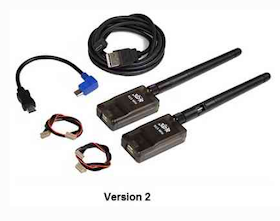
<html> <div class=„separator“ style=„clear: both; text-align: center;“> <a href=„https://1.bp.blogspot.com/-cVaH8Y4I0jE/WUZAlW-ROLI/AAAAAAABgmQ/aMo2RORPqHIjMsX61_aNwdaW81CXK9o3gCLcBGAs/s1600/Schermata%2B2017-06-18%2Balle%2B10.57.41.png“ imageanchor=„1“ style=„“><img border=„0“ data-original-height=„638“ data-original-width=„808“ height=„220“ src=„https://1.bp.blogspot.com/-cVaH8Y4I0jE/WUZAlW-ROLI/AAAAAAABgmQ/aMo2RORPqHIjMsX61_aNwdaW81CXK9o3gCLcBGAs/s280/Schermata%2B2017-06-18%2Balle%2B10.57.41.png“ width=„280“/></a></div> I needed to connect a Raspberry Pi Zero to a Linux Server hosted at my house (1km away). I couldn't use WiFi for problems of signal range, for this reason I opted to connect 2 stations with a Wireless Serial Connection by a cheap <a href=„http://ardupilot.org/copter/docs/common-3dr-radio-advanced-configuration-and-technical-information.html“>SiK Telemetry Radio V2 433Mhz</a> (20$).<p>To create a Peer to Peer TCP/IP connection I used SLIP (Serial Line Internet Protocol).<br/></p><h4> Server-Side:</h4> - Connect a USB Telemetry Radio, with dmesg we check the serial port name<br/>   $ dmesg | grep now attached<br/> - Load a SLIP module<br/>   $ sudo modprobe slip<br/> - Install net-tools for slattach tool<br/>   $ sudo apt install net-tools<br/> - Configure SLIP and attach to a serial port<br/>   $ sudo slattach -L -s 57600 -p slip /dev/####Serial_Port_Name<br/> - On another console create a network interface<br/>    $ sudo ifconfig sl0 192.168.5.1 dstaddr 192.168.5.2<br/> - [OPT] Sharing internet connection, <a href=„https://help.ubuntu.com/community/Internet/ConnectionSharing“>follow this link</a>.<br/><h4> On Raspberry Pi Zero:</h4> - Connect a Telemetry Radio on Raspberry Pi Zero <a href=„https://it.pinout.xyz/pinout/serial_pi_zero“>Board</a><br/> - Load a SLIP module<br/>   $ sudo modprobe slip<br/> - Configure SLIP and attach to a serial port<br/>   $ sudo slattach -L -s 57600 -p slip /dev/ttyAMA0<br/> - On another console create a network interface<br/>    $ sudo ifconfig sl0 192.168.5.2 dstaddr 192.168.5.1<br/> - Test TCP/IP connection<br/>   $ ping 192.168.5.1<br/><h4> Simple test Video with 2 Ubuntu Machine:</h4> <br/><iframe allowfullscreen=„“ frameborder=„0“ height=„210“ src=„https://www.youtube.com/embed/rR9ixE3_h0A?ecver=1“ width=„280“>[embedded content]</iframe>

<br/><div> <br/></div> <div> <h4> Links:</h4> <a href=„https://playground.arduino.cc/Code/SerialIP#CurrentVersion“>SerialIP Arduino</a><br/><a href=„http://ardupilot.org/copter/docs/common-3dr-radio-advanced-configuration-and-technical-information.html“>SiK Radio — Advanced Configuration</a></div> <div style=„clear: both;“/> </html>
 Falls nicht anders bezeichnet, ist der Inhalt dieses Wikis unter der folgenden Lizenz veröffentlicht: CC Attribution-Noncommercial-Share Alike 4.0 International